English translation
Step-by-Step Guide: Build a Web-Reading AI Agent with Coze
AI Article Decision Snapshot
Turn the lesson into workflow, model, budget, and security checks before choosing tools.
Use this quick snapshot before leaving the article. It keeps the next search tied to practical AI software, model/API, cost, privacy, and implementation questions.
Workflow fit
Identify the real job behind the article: coding, research, document review, support, analytics, content, or internal automation.
Model or tool decision
Decide whether the next step is a software shortlist, an AI tool comparison, an API platform choice, or a model benchmark.
Budget and usage signal
Estimate seats, API calls, prompt volume, retries, review time, and fallback work before assuming the workflow is cheap.
Security and privacy review
Check whether source code, customer data, private documents, prompts, logs, or embeddings will enter the AI workflow.
An AI agent capable of reading web pages isn’t merely about copying raw HTML content—it’s about intelligently identifying the main article body, filtering out irrelevant elements (e.g., ads, navigation bars), extracting verifiable evidence, and explicitly stating uncertainty when supporting evidence is insufficient.
When building such agents, I deliberately design failure-handling pathways: What happens if a webpage fails to load? What if the main content is too short? How do we handle ad-heavy or dynamically rendered pages? And how should source citations be displayed? Clearly specifying these failure modes makes the tool robust and production-ready.
Hello, I’m Guo Zhen.
Recently, I’ve received numerous messages from readers via our backend—many want to learn AI agent development.
During my research, I noticed an interesting trend: Most public accounts only showcase polished demo cases—without any explanation, without walking through how they were built. As a result, readers end up saving dozens of examples but still feel completely lost when trying to build one themselves.
1 Motivation Behind This Article
So today, I’m writing this article specifically to solve that problem—to help you grasp the most fundamental technical concept in AI agent development: the workflow. If you’re interested in this topic, keep reading.
Using Coze (a no-code/low-code AI agent development platform), I’ve built a workflow-based agent that can read any webpage—including both standard HTML pages and PDF documents hosted online. This makes it an ideal entry point for learning agent development, as illustrated below:
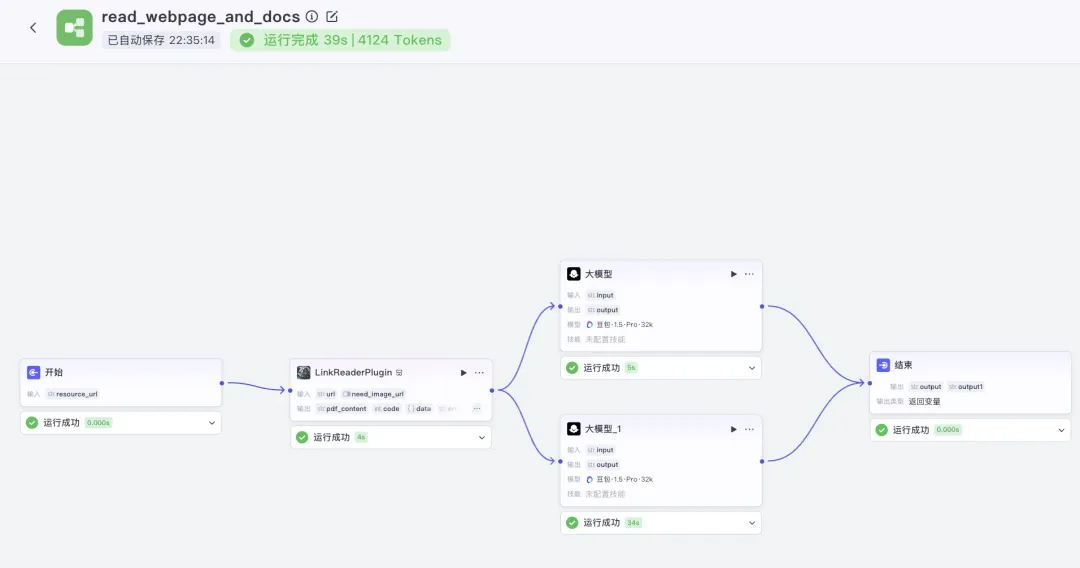
The most compelling technical feature of Coze for building agent applications is its Workflow system. Mastering workflows essentially means mastering Coze agent development.
When trying to understand any complex system, avoid jumping straight into advanced details. Instead, start with the core idea—that’s critical. Following this principle, the workflow shown above strikes the perfect balance: it’s neither oversimplified nor overly complicated—just right for fully grasping how workflows operate.
Understanding > Memorization ×100. Please prioritize deep conceptual understanding—not rote memorization—of workflow logic.
2 A Layman’s Explanation of Coze Workflow Internals
To grasp Coze’s workflow logic, let’s use the classic everyday analogy: “Putting an elephant into a refrigerator.”
Think of a Coze workflow exactly like that:
- Opening the fridge door = triggering the workflow (the trigger node),
- Putting the elephant inside = performing AI-powered processing (an action node),
- Closing the fridge door = finalizing the workflow and returning output (the output node).
Those three steps—open, insert, close—are what Coze calls a workflow.
Does this already give you a rough intuition about how Coze workflows work? Great—you’ve already succeeded at step one.
That’s Part 1 of understanding Coze workflow internals. Now let’s move to Part 2: data flow—how information passes between nodes.
Put simply, imagine buying popcorn from a street vendor:
- You hand the vendor ¥1 — that’s your input,
- He uses that ¥1 to pop corn for you — that’s the processing step,
- Finally, he hands you the freshly popped corn — that’s the output.
So here’s Coze’s second foundational workflow principle: ➡️ The output of one node becomes the input of the next.
3 Step-by-Step Construction of the “Read Any Webpage” Workflow
Once you internalize Coze’s two core workflow principles—(1) sequential execution and (2) data chaining—you’ll find building even moderately complex workflows intuitive. Let’s walk through constructing our “read any webpage” workflow together.
The workflow starts with a single user-provided input: a URL—the webpage address we want to fetch.
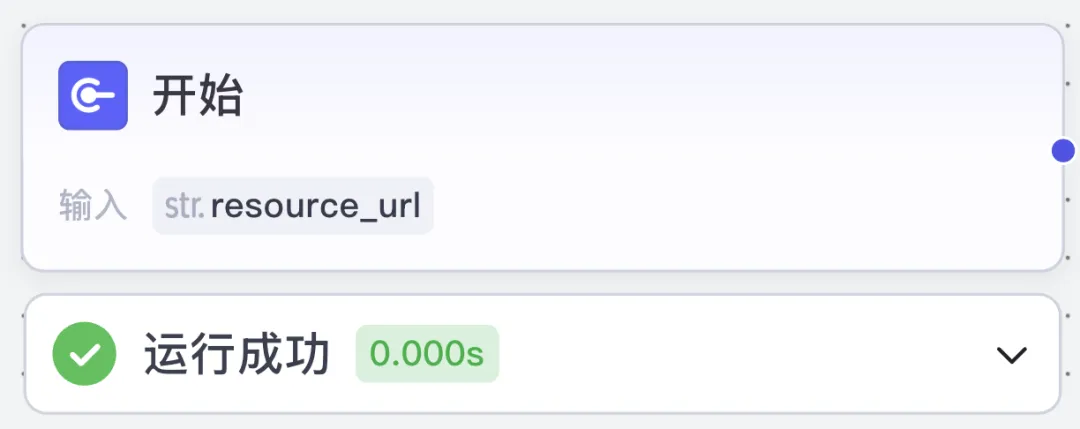
This resource_url value flows directly into the next node—a Coze-official plugin called LinkReader, which supports fetching both HTML page content and PDFs embedded on webpages:
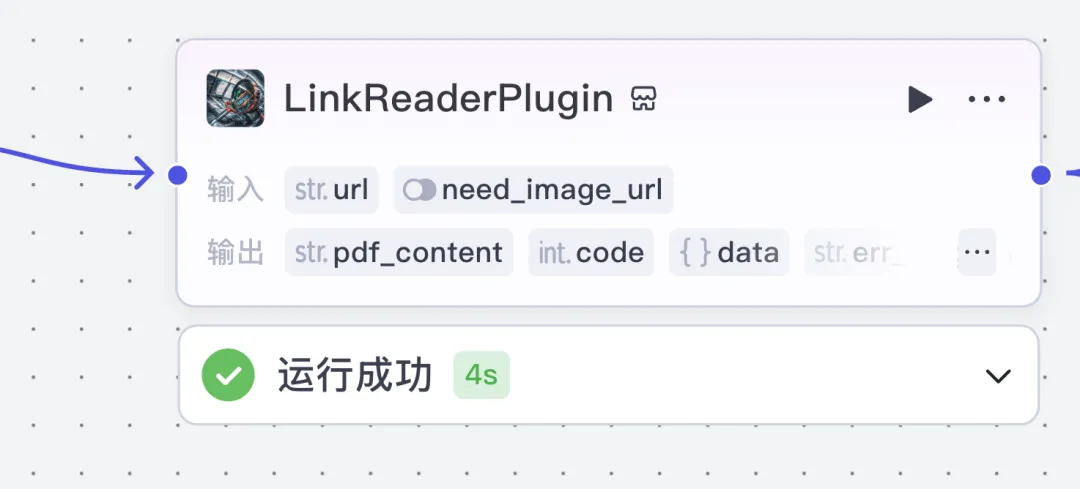
This plugin perfectly fits our needs. Once selected, the next step is to understand its input/output interface. Its input is straightforward (resource_url), but the key challenge is aligning the data chain correctly—which is actually simple once you internalize the data-flow principle: just map the current node’s input to the previous node’s output field (resource_url). See below:
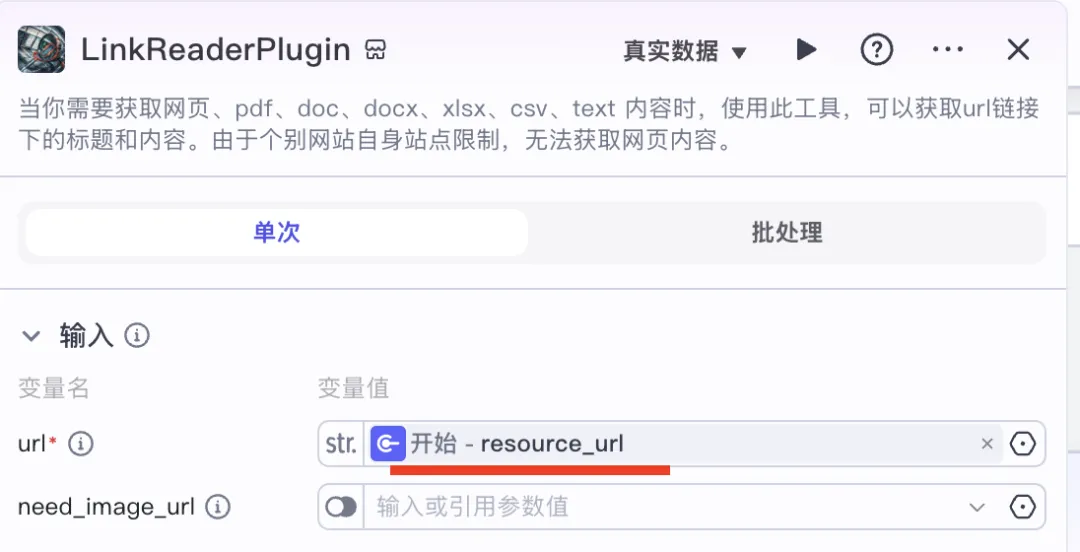
✅ Aligning data chains between adjacent nodes is the single most important workflow principle in Coze—and it applies everywhere. Make sure you truly understand it.
The output structure must also match the next node’s expected input format. These schemas are consistent across the pipeline. Clicking the node card reveals its output schema on the right panel:
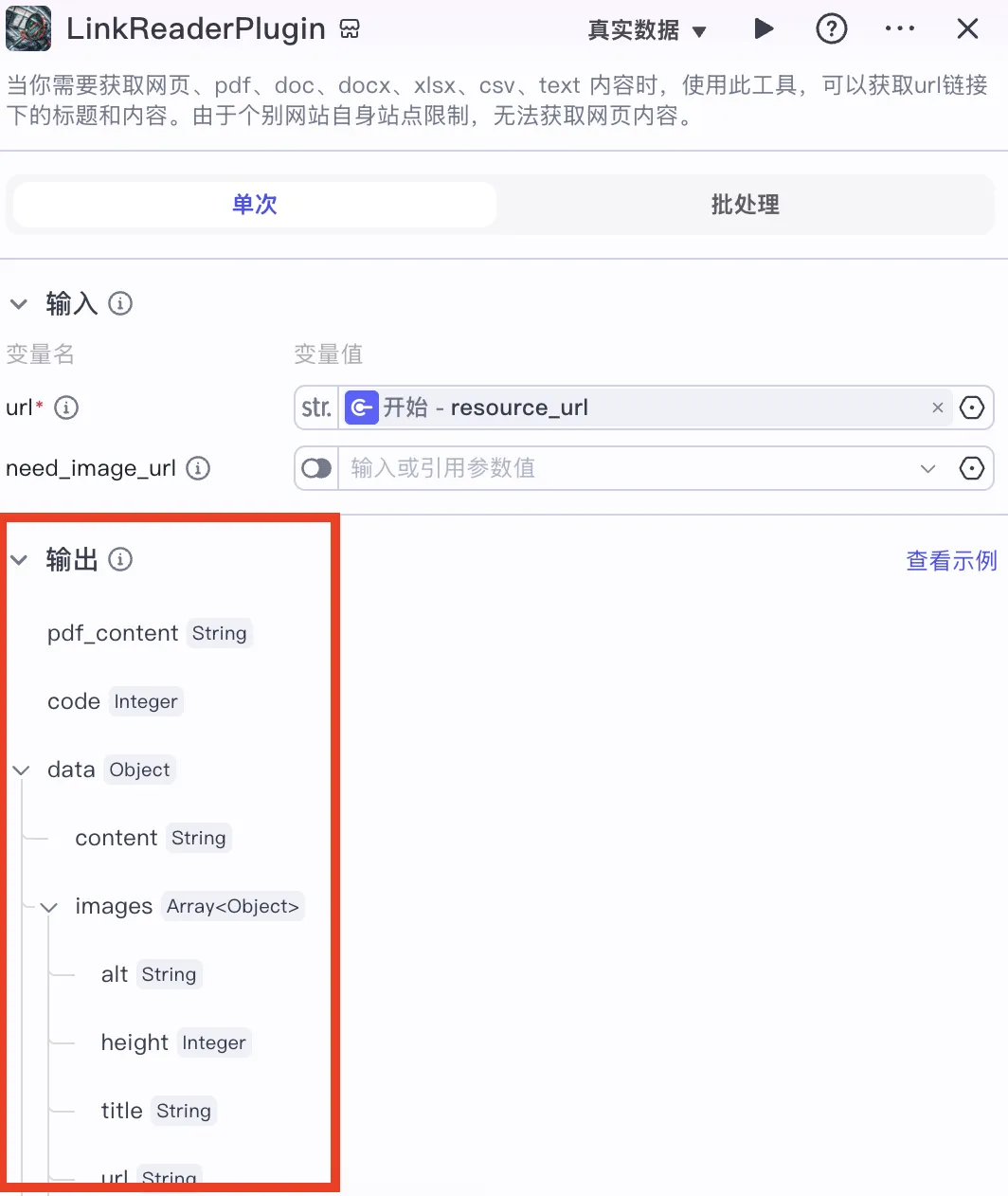
It’s clearly labeled:
pdf_contentcontains extracted PDF text,data.contentholds the cleaned HTML article body.
You must understand this distinction precisely—otherwise downstream inputs will fail.
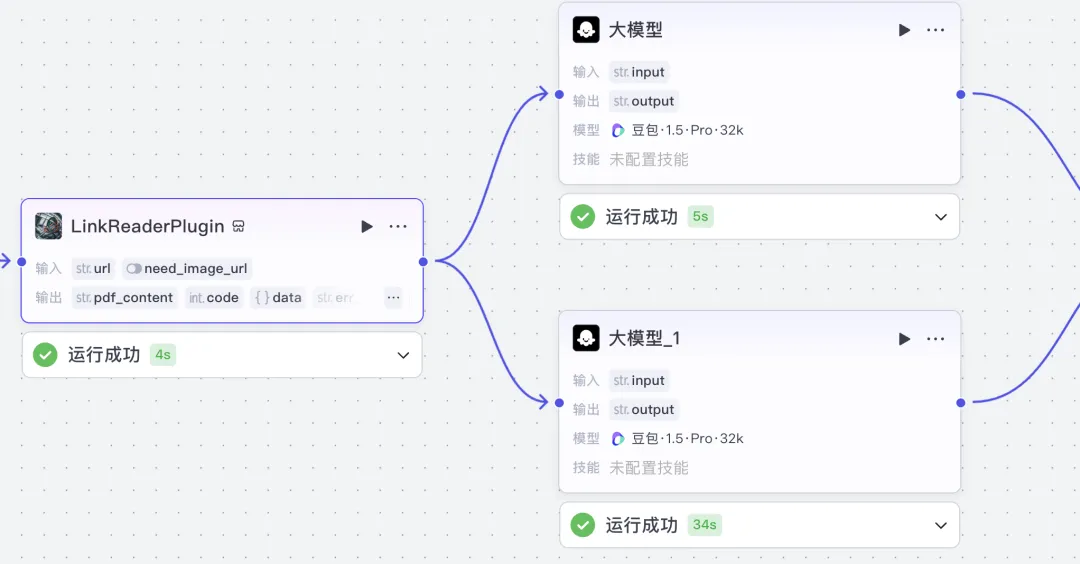
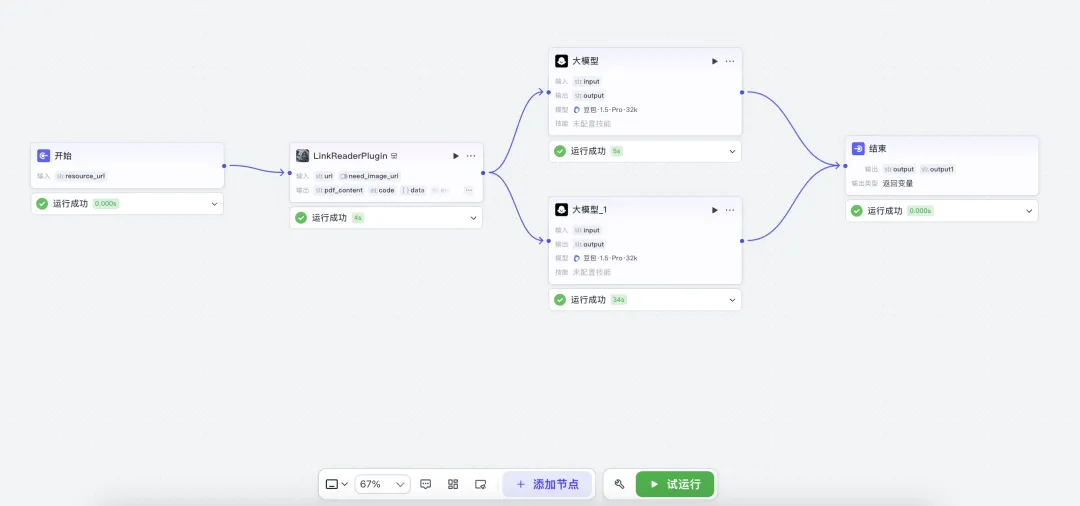
Since we have two distinct outputs (pdf_content and data.content), we naturally split the workflow into two parallel branches:
- One feeds
pdf_contentinto the LLM node, responsible for analyzing PDFs; - The other feeds
data.contentinto LLM_1, handling HTML page analysis:
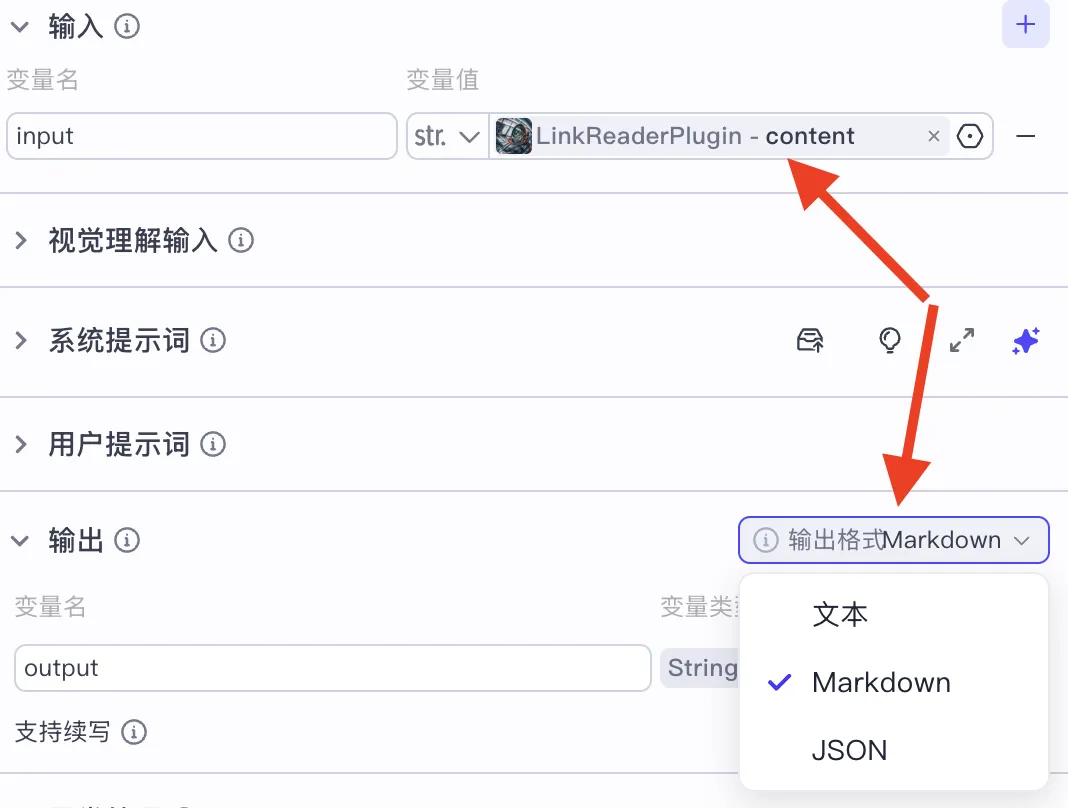
Feeding those inputs into their respective LLM nodes:
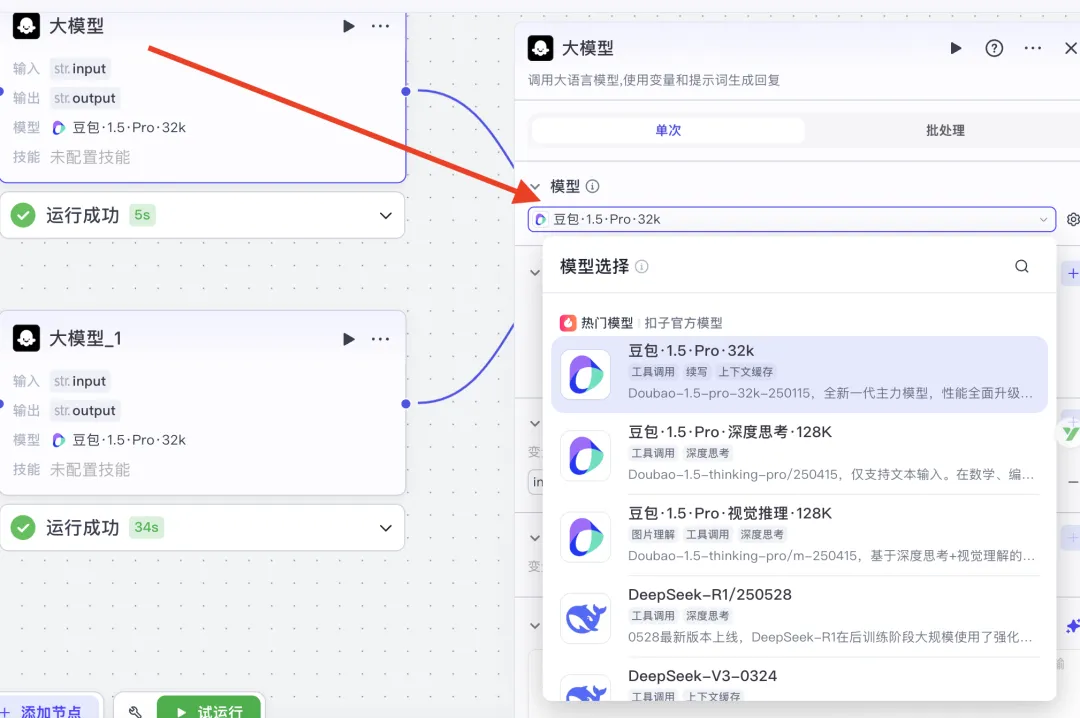
Result after PDF analysis:
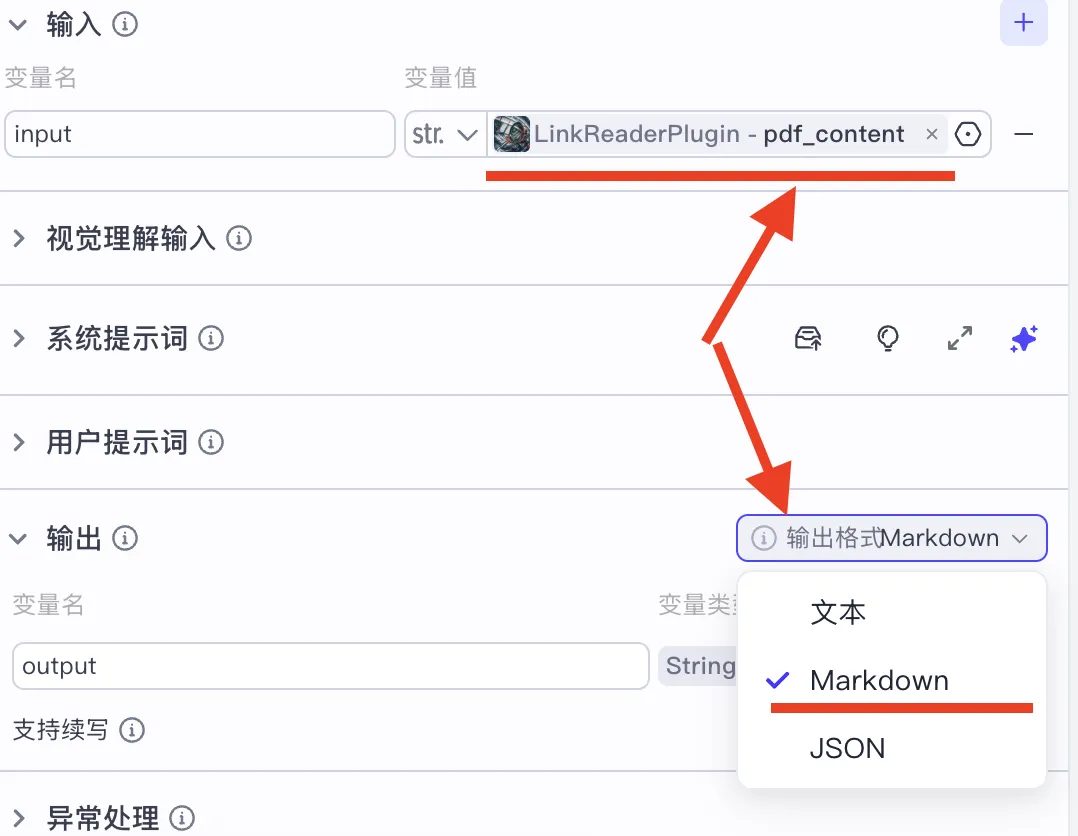
Result after HTML page analysis:
Thus, the final node receives two possible outputs:
outputfor PDF summaries,output1for HTML page summaries:
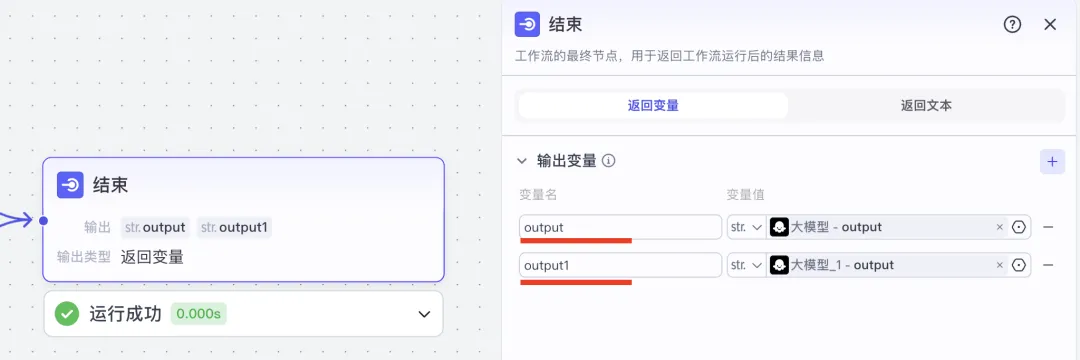
Variable names are arbitrary—you just need to keep them aligned across connected nodes.
And that’s it—the full workflow is now built:
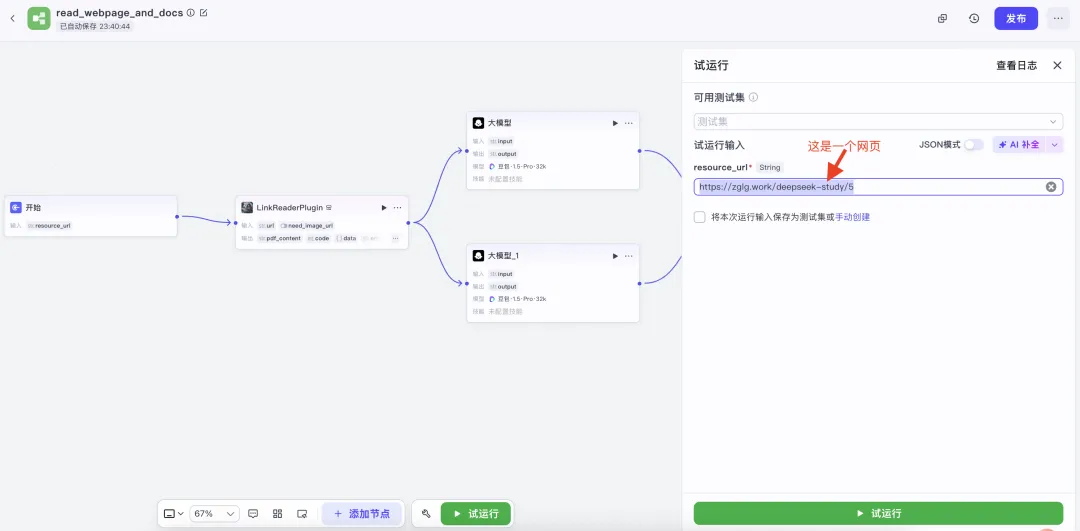
Let’s test it! Enter a sample webpage URL:
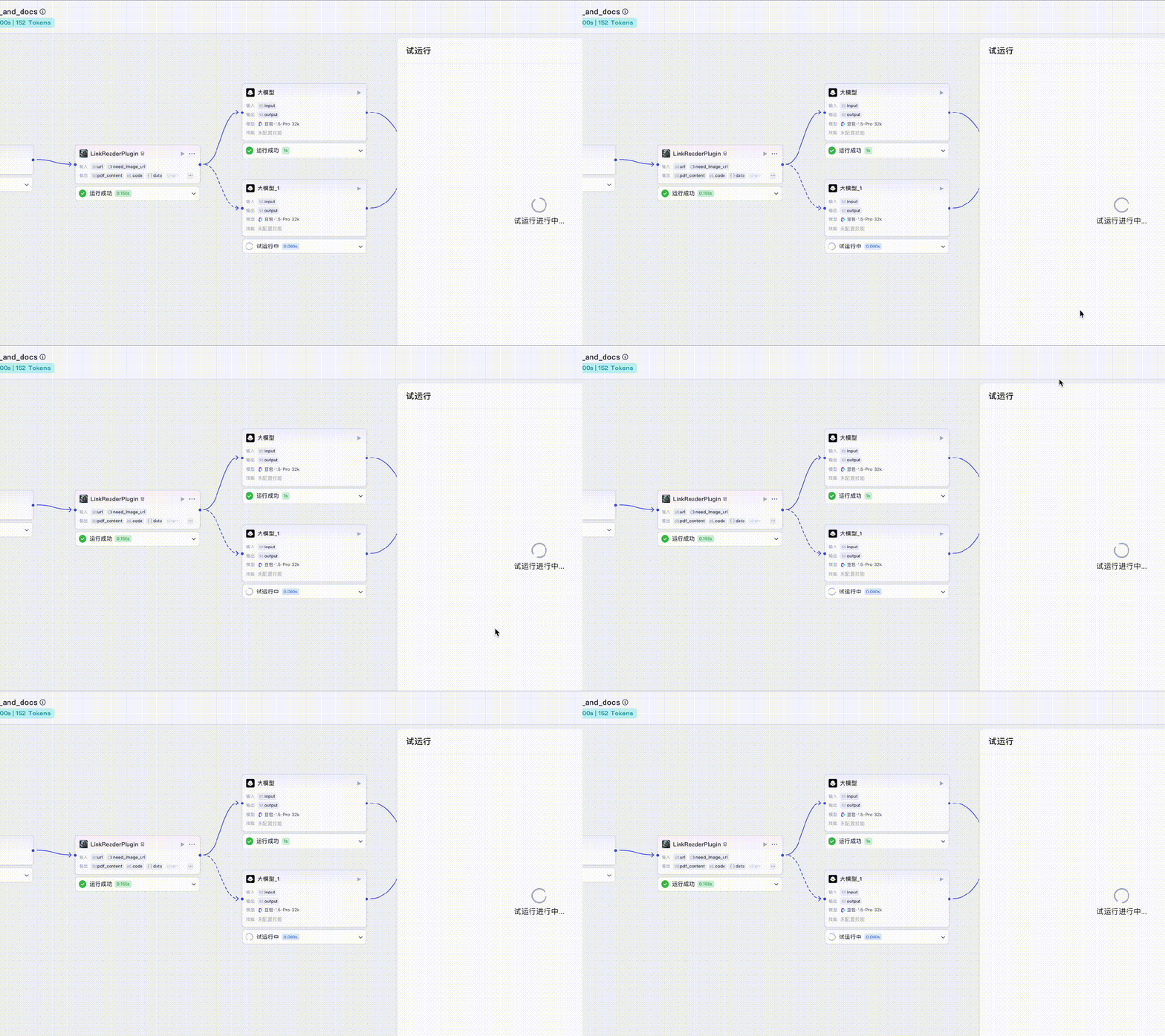
Click “Test Run”. As shown in the GIF below, dashed-line branches animate in real time—indicating active processing. Since we entered an HTML URL, the HTML branch lights up:
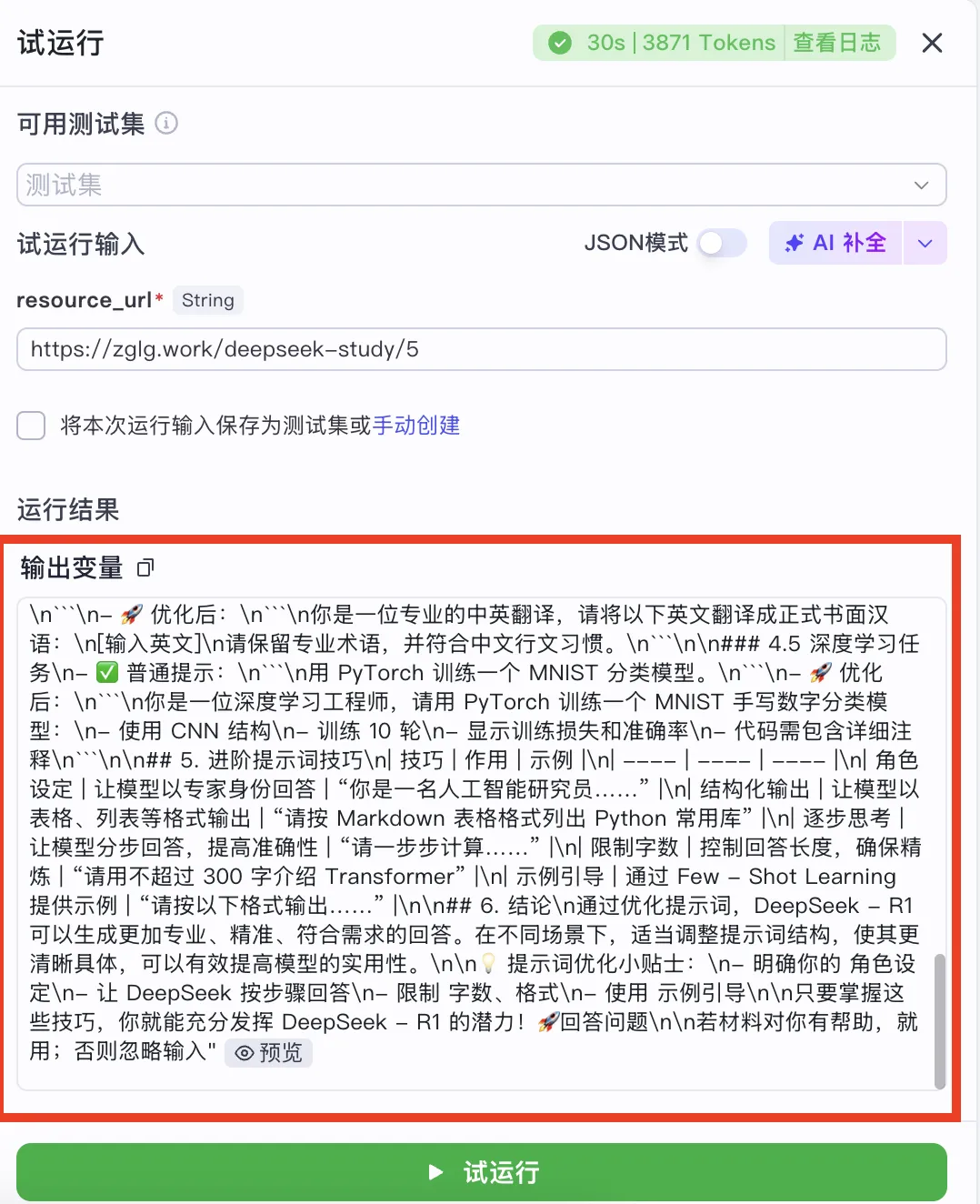
Once complete, you’ll see the extracted webpage content successfully returned:
PDF extraction follows the same pattern—no need to repeat here.
That concludes our walkthrough of building the “read any webpage” workflow in Coze—with detailed visual breakdowns of every node’s input/output configuration and data-flow logic.
For more hands-on agent development case studies, check out my newly launched course: 《Practical AI Agent Development Video Course》 (Currently in active development—early-bird pricing available while recording continues)

In Summary
Many learners want to dive into AI agent development—but most platforms only show flashy demos, skipping the why and how. That leaves people collecting bookmarks without gaining real skills.
This article bridges that gap by explaining—from first principles—the most essential foundation of Coze agent development: the workflow mechanism.
We used two relatable analogies—“putting an elephant in a fridge” and “buying popcorn”—to clarify three core workflow concepts: 🔹 Triggering (starting the process), 🔹 Node-level processing (AI actions), 🔹 Output delivery (returning results), plus the critical rule of inter-node data propagation.
With this understanding, you’ll know how agents actually work—not just what they do.
Finally, we built a real-world “read any webpage” agent in Coze, dissecting each node’s configuration, data mapping, and branching logic—step by step, visually and concretely.
Apply This Lesson
Turn this article into AI software, model, API, and security decisions.
English Article FAQ
Use this article as evidence before choosing AI tools
How should I use this AI Tutorials article?
Use it as the implementation or learning layer, then connect the idea to AI software buyer guides, tool comparisons, benchmarks, API choices, and security checks before making a production decision.
Is this English article different from the Chinese original?
The English edition is localized for global AI readers while preserving the original diagrams, screenshots, prompts, code examples, and source context from the Chinese article.
What should I read after Step-by-Step Guide: Build a Web-Reading AI Agent with Coze?
Continue with AI Software Buyer Guides, AI Tools Workbench, Best AI Coding Agents, AI Model Benchmarks, OpenAI vs Anthropic API, or LLM Security Tools depending on the decision you need to make.
Can this article alone choose an AI product or model?
No. Treat the article as evidence and context, then validate fit with pricing, privacy requirements, integration effort, benchmark results, workflow tests, and fallback planning.
Continue