English translation
Load dataset
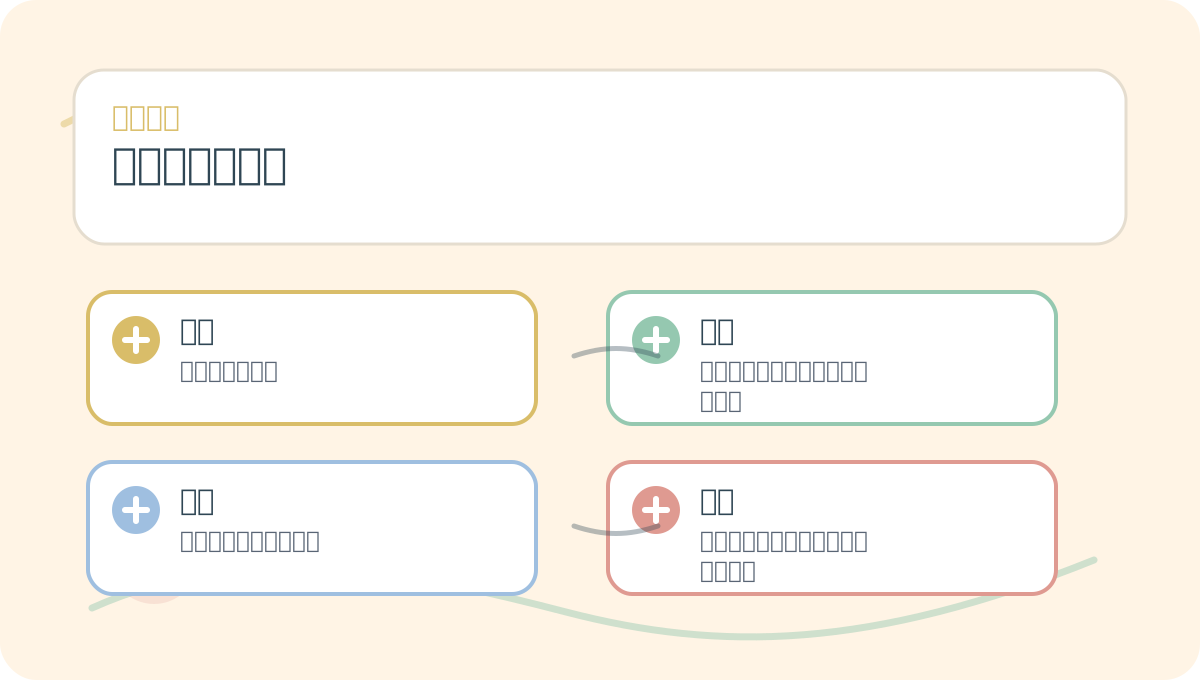
AI Article Decision Snapshot
Turn the lesson into workflow, model, budget, and security checks before choosing tools.
Use this quick snapshot before leaving the article. It keeps the next search tied to practical AI software, model/API, cost, privacy, and implementation questions.
Workflow fit
Identify the real job behind the article: coding, research, document review, support, analytics, content, or internal automation.
Model or tool decision
Decide whether the next step is a software shortlist, an AI tool comparison, an API platform choice, or a model benchmark.
Budget and usage signal
Estimate seats, API calls, prompt volume, retries, review time, and fallback work before assuming the workflow is cheap.
Security and privacy review
Check whether source code, customer data, private documents, prompts, logs, or embeddings will enter the AI workflow.

Model selection is not merely about automatically picking the highest-scoring model—it also requires careful consideration of complexity, stability, and interpretability cost. AutoML must retain a human review checkpoint.

I compare the best-performing model against a simple baseline. If a more complex model delivers only marginally better performance, its maintenance overhead may not be justified.
In automated machine learning (AutoML), model selection is a critical step. Its core objective is to identify the most suitable algorithm and model configuration for a given dataset and problem type. Below, we explore several common model selection strategies—and how to apply them effectively to improve model performance.
1. Performance-Based Selection
The most common model selection approach compares models based on their performance on a validation set—typically assessed via cross-validation. Cross-validation partitions the dataset into k folds; each fold serves once as a test set while the remaining folds train the model. Final performance is computed as the average across all folds.

When selecting an AutoML model, first compare validation metrics, stability, interpretability, inference cost, deployment environment compatibility, and maintenance difficulty.
Example: Model Selection Using Cross-Validation
Suppose we have a classification dataset and wish to select the best-performing model among several candidates. Here’s a Python example using the Iris dataset:
from sklearn.model_selection import cross_val_score
from sklearn.ensemble import RandomForestClassifier
from sklearn.svm import SVC
from sklearn.datasets import load_iris

# Load dataset
data = load_iris()
X, y = data.data, data.target

# Define candidate models
models = {
    'Random Forest': RandomForestClassifier(),
    'SVM': SVC()
}

# Evaluate performance of each model
for model_name, model in models.items():
    scores = cross_val_score(model, X, y, cv=5)  # 5-fold cross-validation
    print(f"Average accuracy of {model_name}: {scores.mean():.2f}")
In this example, Random Forest and SVM are evaluated on the Iris dataset using 5-fold cross-validation. By comparing their mean accuracies, we can select the top-performing model.
2. Hyperparameter Optimization–Based Selection
Beyond choosing among algorithms, optimizing hyperparameters—the settings configured before training—is equally vital to model selection. These parameters significantly influence model behavior and generalization.
You don’t need to absorb every detail of “Model Selection Methods” at once. Start with one small, hands-on problem you can verify yourself—then use the diagrams and main text to fill in conceptual gaps.
Example: Hyperparameter Tuning with Grid Search
GridSearchCV systematically explores predefined hyperparameter combinations to find the configuration yielding optimal performance. For instance, we can tune the kernel type and regularization parameter C for an SVM:
from sklearn.model_selection import GridSearchCV

# Define model and hyperparameter grid
model = SVC()
param_grid = {
    'C': [0.1, 1, 10],
    'kernel': ['linear', 'rbf']
}

grid_search = GridSearchCV(model, param_grid, cv=5)
grid_search.fit(X, y)

print(f"Best parameters: {grid_search.best_params_}")
print(f"Best cross-validated score: {grid_search.best_score_:.2f}")
Hyperparameter tuning helps discover configurations better aligned with the data’s underlying structure.
3. Ensemble Learning Approaches
Ensemble methods combine predictions from multiple base models to improve both predictive accuracy and stability. Widely used techniques include Bagging and Boosting.
Example: Ensemble Modeling with RandomForest and AdaBoost
from sklearn.ensemble import RandomForestClassifier, AdaBoostClassifier

# Define base estimator and ensemble
rf = RandomForestClassifier()
ab = AdaBoostClassifier(base_estimator=rf)

# Evaluate ensemble performance
scores = cross_val_score(ab, X, y, cv=5)
print(f"Average accuracy of ensemble model: {scores.mean():.2f}")
Ensembles reduce variance and often yield more robust generalization than individual models.
4. Learning Curve–Based Selection
A learning curve visualizes how model performance changes as training set size increases. Plotting learning curves reveals whether a model suffers from high bias (underfitting) or high variance (overfitting)—guiding decisions about data requirements and model complexity.
Example: Plotting a Learning Curve
import matplotlib.pyplot as plt
from sklearn.model_selection import learning_curve

train_sizes, train_scores, test_scores = learning_curve(SVC(), X, y, cv=5)

train_scores_mean = train_scores.mean(axis=1)
test_scores_mean = test_scores.mean(axis=1)

plt.plot(train_sizes, train_scores_mean, label='Training Accuracy')
plt.plot(train_sizes, test_scores_mean, label='Validation Accuracy')
plt.title('Learning Curve')
plt.xlabel('Number of Training Samples')
plt.ylabel('Accuracy')
plt.legend()
plt.show()
Learning curves help diagnose overfitting/underfitting and inform choices about model capacity and required training data volume.

After reading this section, consolidate “Model Selection Methods” into a retrospective table: clarify the central narrative first, then validate it using a small task.

After finishing “Model Selection Methods,” try walking through a small end-to-end example. Then assess which steps you can now execute independently.
Summary
Effective model selection draws on multiple complementary strategies: performance-based ranking, hyperparameter optimization, ensemble construction, and learning curve analysis. Thoughtful selection not only boosts prediction accuracy but also enhances model stability and adaptability to new data. In the next chapter, we’ll examine evaluation metrics in depth—key tools for rigorously interpreting model behavior and performance.
Apply This Lesson
Turn this article into AI software, model, API, and security decisions.
English Article FAQ
Use this article as evidence before choosing AI tools
How should I use this AI Tutorials article?
Use it as the implementation or learning layer, then connect the idea to AI software buyer guides, tool comparisons, benchmarks, API choices, and security checks before making a production decision.
Is this English article different from the Chinese original?
The English edition is localized for global AI readers while preserving the original diagrams, screenshots, prompts, code examples, and source context from the Chinese article.
What should I read after Load dataset?
Continue with AI Software Buyer Guides, AI Tools Workbench, Best AI Coding Agents, AI Model Benchmarks, OpenAI vs Anthropic API, or LLM Security Tools depending on the decision you need to make.
Can this article alone choose an AI product or model?
No. Treat the article as evidence and context, then validate fit with pricing, privacy requirements, integration effort, benchmark results, workflow tests, and fallback planning.
Continue