English translation
Permissions, Configuration, and Security Boundaries in Claude Code: Which Commands to Allow and Which to Block
AI Article Decision Snapshot
Turn the lesson into workflow, model, budget, and security checks before choosing tools.
Use this quick snapshot before leaving the article. It keeps the next search tied to practical AI software, model/API, cost, privacy, and implementation questions.
Workflow fit
Identify the real job behind the article: coding, research, document review, support, analytics, content, or internal automation.
Model or tool decision
Decide whether the next step is a software shortlist, an AI tool comparison, an API platform choice, or a model benchmark.
Budget and usage signal
Estimate seats, API calls, prompt volume, retries, review time, and fallback work before assuming the workflow is cheap.
Security and privacy review
Check whether source code, customer data, private documents, prompts, logs, or embeddings will enter the AI workflow.
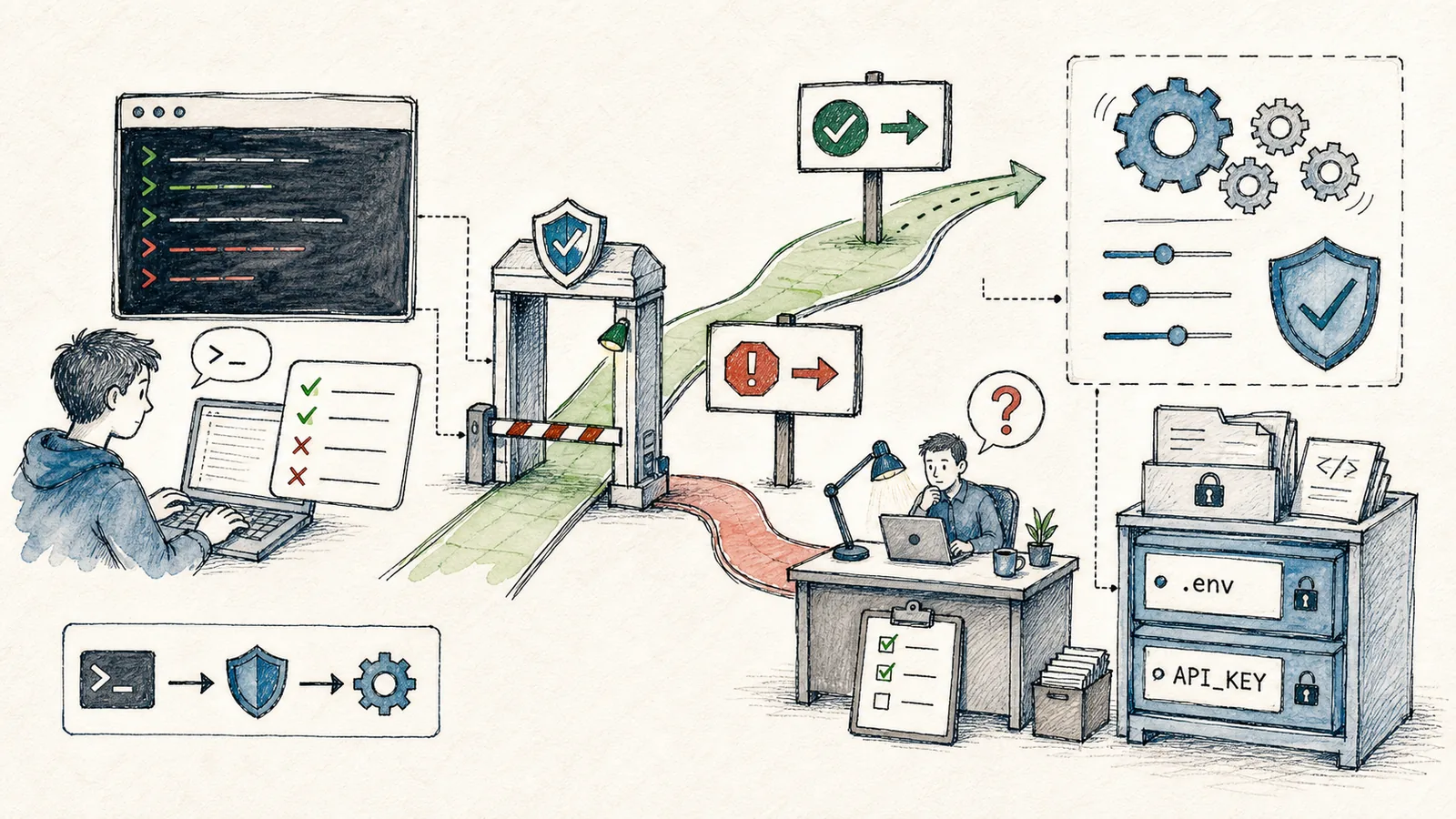
The biggest difference between Claude Code and ordinary chat tools is that it can actually interact with your project: reading files, modifying files, executing commands, and connecting to external tools. As its capabilities grow, security boundaries must be defined in advance.
My principle is simple:
- Reading code may be permitted more broadly;
- Modifying code should be scoped carefully;
- Deleting files, uploading assets, deploying, or altering databases must be handled with extreme caution.
I never enable all commands by default. Commands like reading files, running linters, or editing local source code belong in one category—while commands like deleting files, modifying databases, connecting to servers, or deploying to production belong in another, higher-risk category—and must be handled separately.
Explaining this layered approach in detail—as opposed to simply saying “be careful with security”—delivers far greater practical value. Readers can use it as a concrete framework to define permission boundaries for their own projects.
Why Permissions Matter
Letting Claude Code run npm run build is usually safe. But letting it execute rm -rf, git reset --hard, scp, systemctl restart, or database migrations requires serious scrutiny.
When configuring permissions for Claude Code, start by classifying operations into distinct risk tiers:
- Reading files
- Modifying code
- Installing dependencies
- Accessing the network
- Deleting files
- Deploying applications
These commands aren’t inherently forbidden—but you must understand their impact. Especially on production servers, user data, payment systems, secrets, keys, and certificates: never grant access just because “the AI says it’s needed.”
Managing Rules with /permissions
The official command reference includes /permissions, a built-in command for managing allow, ask, and deny rules. You can add common low-risk commands to the allow list, while reserving high-risk ones for explicit confirmation (ask) or outright blocking (deny).
When reading “Permissions, Settings, and Security Boundaries: Which Commands to Allow—and Which to Block”, treat the accompanying diagrams as navigation cards:
- First, grasp the overall flow;
- Then examine why each step matters;
- Finally, verify edge cases and boundary conditions.
Here’s my typical tiered rule set:
- Allow:
git status,git diff,rg,ls, reading files, running existing project tests. - Ask: Installing dependencies, modifying configuration files, executing deployment scripts, establishing remote connections.
- Deny: Reading private keys, printing
.envcontents, deleting large directories, resetting Git history, directly manipulating production databases.
This isn’t a rigid template—you must adapt it to your specific project context.
Don’t Copy settings.json Blindly
Claude Code settings can reside in files like .claude/settings.json. The official documentation lists many configurable options—including MCP server allowlists, hooks URL allowlists, permission rules, and auto-memory toggles.
New users shouldn’t copy-paste someone else’s full settings file right away. Instead, begin with only the minimal essential rules:
{
  "permissions": {
    "deny": [
      "Bash(rm -rf *)",
      "Read(.env)",
      "Read(**/*.pem)"
    ]
  }
}
Exact syntax depends on the official documentation and your current Claude Code version. The key idea here is progressive hardening: block obvious dangers first, then incrementally add convenience rules as needed.
Handling Sensitive Files
Common sensitive assets in projects include:
.envfiles.pemand.keyfiles- Certificate directories
- Database dumps
- Server passwords
- OAuth tokens
- Payment webhook secrets
These files must never appear in tutorials, logs, or version control history—and should never be printed out by Claude Code “for debugging.” You can let it read variable names, configuration examples, or .env.example, but never real credential values.
Tiered Deployment Commands
A failed local build causes minimal impact. A failed production deployment affects real users. So I recommend splitting deployments into three distinct phases:
To apply “Permissions, Settings, and Security Boundaries: Which Commands to Allow—and Which to Block” to your own tasks, start small: isolate and rigorously validate one critical decision point.
After studying “Permissions, Settings, and Security Boundaries: Which Commands to Allow—and Which to Block”, try adapting it to a scenario of your own—focusing specifically on whether inputs, processing logic, and outputs align coherently.
- Ask Claude Code to describe the intended deployment command.
- Have it perform local builds or tests first.
- Only then decide whether to proceed with remote deployment.
For team projects, deployment scripts should be documented and integrated into CI pipelines—not left to individual memory or ad-hoc execution.
The more familiar you become with Claude Code, the more precisely you should codify its security rules. Its purpose is to save time—not to bypass authority.
Next up: Skills and custom commands. Don’t rewrite the same prompt repeatedly for repetitive tasks—instead, formalize them as reusable tools.
References:
Apply This Lesson
Turn this article into AI software, model, API, and security decisions.
English Article FAQ
Use this article as evidence before choosing AI tools
How should I use this AI Tutorials article?
Use it as the implementation or learning layer, then connect the idea to AI software buyer guides, tool comparisons, benchmarks, API choices, and security checks before making a production decision.
Is this English article different from the Chinese original?
The English edition is localized for global AI readers while preserving the original diagrams, screenshots, prompts, code examples, and source context from the Chinese article.
What should I read after Permissions, Configuration, and Security Boundaries in Claude Code: Which Commands to Allow and Which to Block?
Continue with AI Software Buyer Guides, AI Tools Workbench, Best AI Coding Agents, AI Model Benchmarks, OpenAI vs Anthropic API, or LLM Security Tools depending on the decision you need to make.
Can this article alone choose an AI product or model?
No. Treat the article as evidence and context, then validate fit with pricing, privacy requirements, integration effort, benchmark results, workflow tests, and fallback planning.
Continue