English translation
DeepSeek v0.5 Released: Local Knowledge Base Integration for Windows and macOS
AI Article Decision Snapshot
Turn the lesson into workflow, model, budget, and security checks before choosing tools.
Use this quick snapshot before leaving the article. It keeps the next search tied to practical AI software, model/API, cost, privacy, and implementation questions.
Workflow fit
Identify the real job behind the article: coding, research, document review, support, analytics, content, or internal automation.
Model or tool decision
Decide whether the next step is a software shortlist, an AI tool comparison, an API platform choice, or a model benchmark.
Budget and usage signal
Estimate seats, API calls, prompt volume, retries, review time, and fallback work before assuming the workflow is cheap.
Security and privacy review
Check whether source code, customer data, private documents, prompts, logs, or embeddings will enter the AI workflow.
Cross-platform installers are notoriously prone to the “works on my machine, fails on yours” problem. Differences in Windows path conventions and antivirus interference—or macOS permission models and code-signing requirements—can all prevent successful startup. When publishing or installing, it’s best to document setup steps separately for each OS—never merge them into a single ambiguous sentence.
If you’re distributing an installer to others, clearly specify:
- Target OS version
- Installation directory
- Required first-launch permissions
- Common error messages and their fixes
Omitting even one of these details—forcing users to “figure it out themselves”—creates a stark difference in experience for beginners.
This article introduces DeepSeekMine, a complete local deployment solution that integrates DeepSeek with your personal knowledge base.
Running DeepSeek locally ensures full confidentiality and security for your private documents and data—no need to upload sensitive files to third-party cloud servers.
Over the past month, we’ve iteratively developed DeepSeekMine. Today, we’re releasing the latest stable version (v0.5)—fully built and packaged for both Windows and macOS.
The software is fully open-source, supports one-click installation, works out-of-the-box, and delivers fast local knowledge retrieval. Interested readers are encouraged to try it.
1 Software Usage Demo
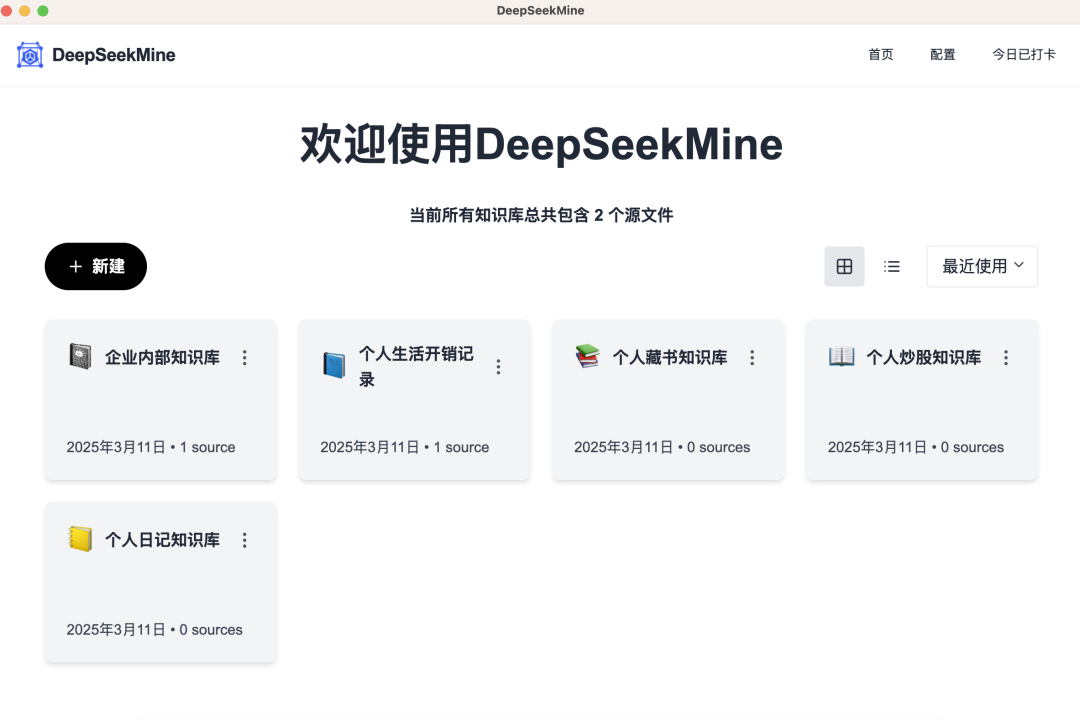
Step 1: Launch the app and land on the homepage. Click “New”, create a dedicated knowledge base category, and name it—for example, Personal Book Library:
Step 2: Click “Import Personal Knowledge”:
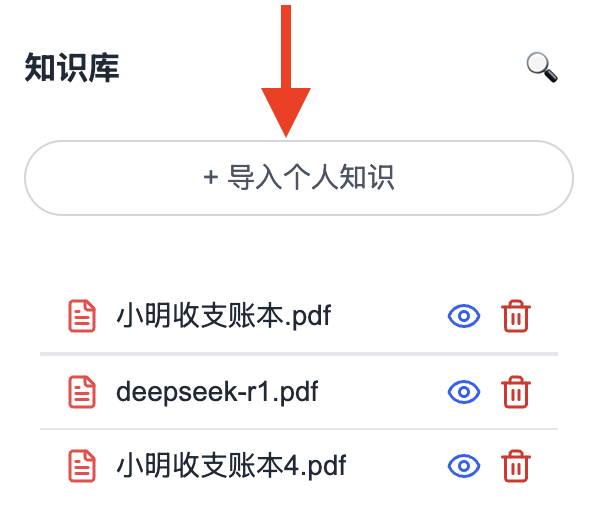
Upload your own files. Currently supported formats: Word (.docx) and PDF. Excel (.xlsx), PowerPoint (.pptx), and source code files (across multiple programming languages) will be added soon:

Step 3: Click the “Settings” button (top-right corner) to configure your locally installed DeepSeek instance. If you haven’t installed DeepSeek yet, use Ollama to do so—download the appropriate version for your system.
The deepseek-r1:1.5b model typically requires ~3 GB GPU VRAM. Most newly purchased laptops meet this requirement. For those considering hardware upgrades:
- Minimum GPU: NVIDIA GTX 1650 (4 GB) or AMD RX 5500 (4 GB)
- RAM: 16 GB
- macOS users: M1/M2/M3 MacBook Air with at least 8 GB unified memory
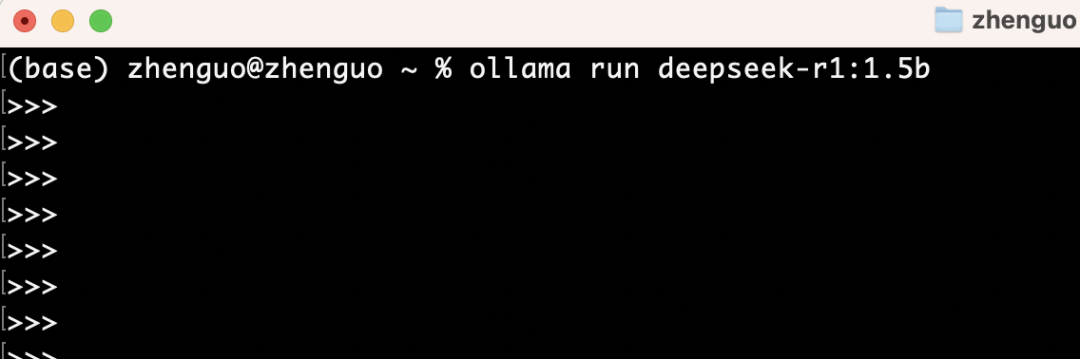
After installing Ollama, run this command to pull the 1.5B model locally:
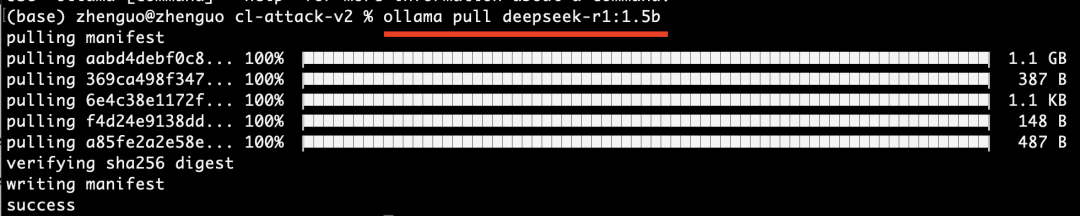
Then execute the following to start chatting with DeepSeek locally:
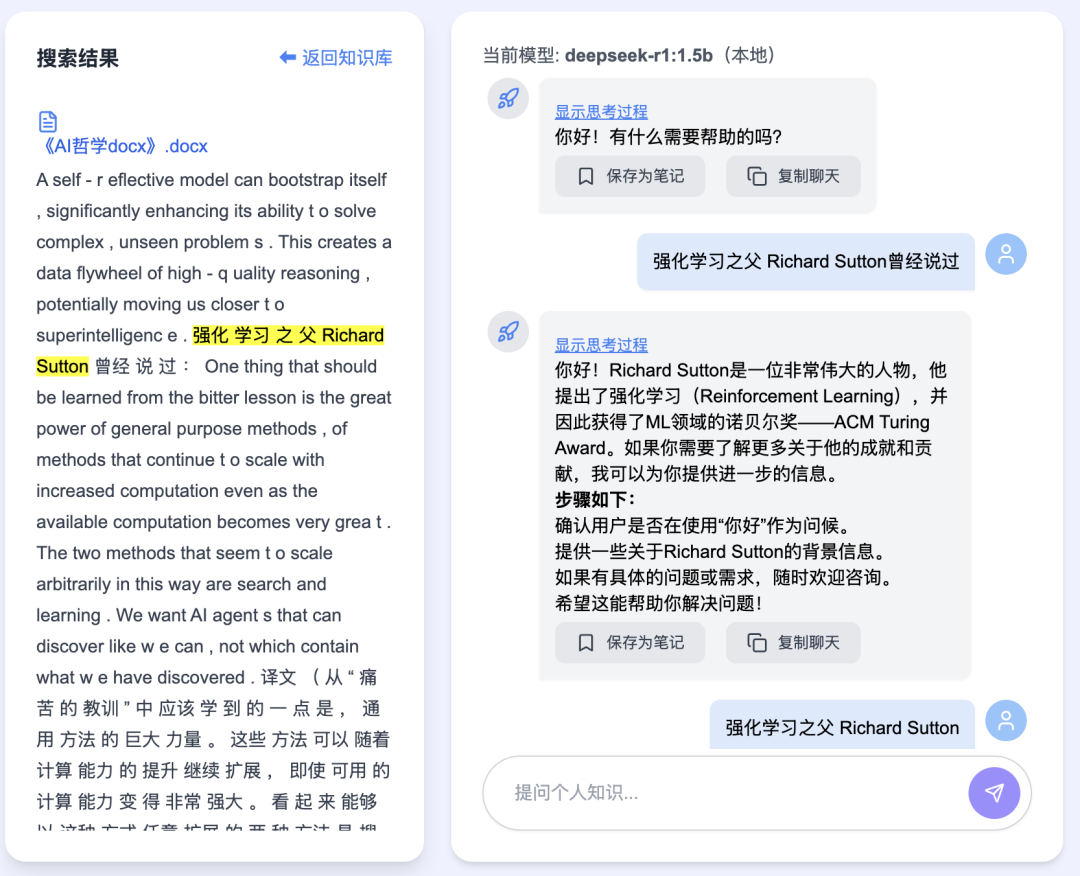
Back in DeepSeekMine, use the central panel below to conduct multi-turn Q&A over your personal knowledge base:
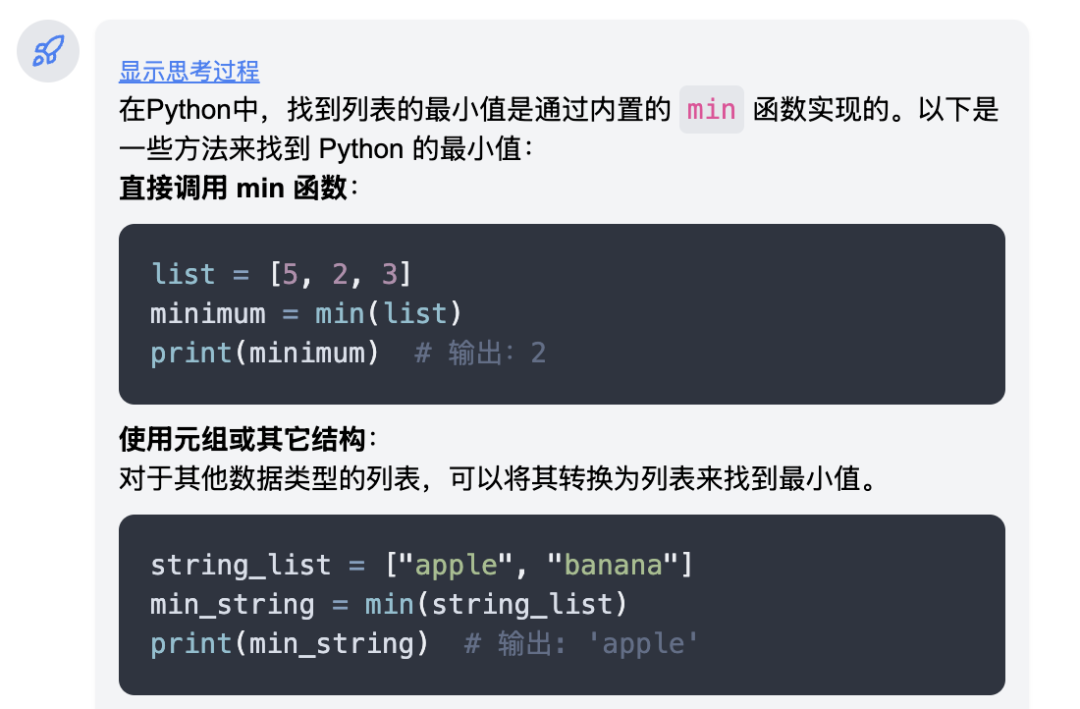
Code blocks support syntax highlighting:
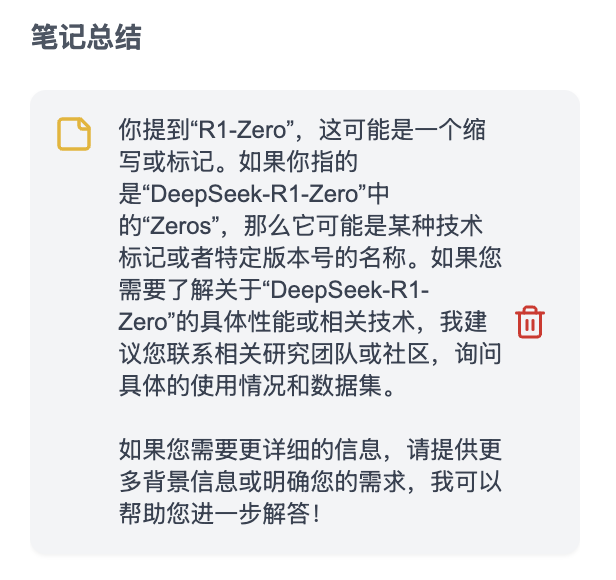
Built-in note-taking and saving functionality:
That covers the core features of DeepSeekMine.
2 How to Get the Software
Today’s release: v0.5, supporting both Windows and macOS—double-click to install instantly:
Once installed, it runs immediately—no further configuration needed. To download: → Subscribe to my WeChat Official Account → Reply with the keyword “KnowledgeBase”

3 Upcoming Updates
Next version’s primary focus: upgrading the core engine and expanding supported file formats.
Many readers have asked about DeepSeekMine’s underlying architecture—here’s a brief overview for the technically curious.
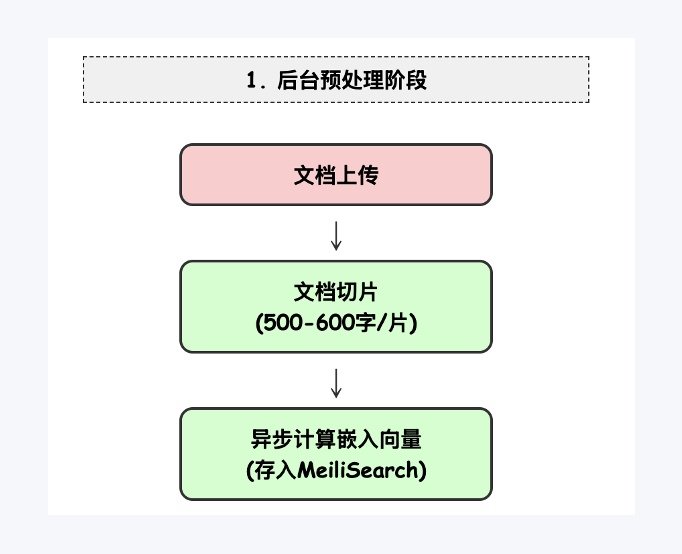
The pipeline consists of three key stages:
Stage 1 — Background Preprocessing Uploaded documents are intelligently chunked and optimized. Using a fine-tuned embedding model, embeddings are computed asynchronously:
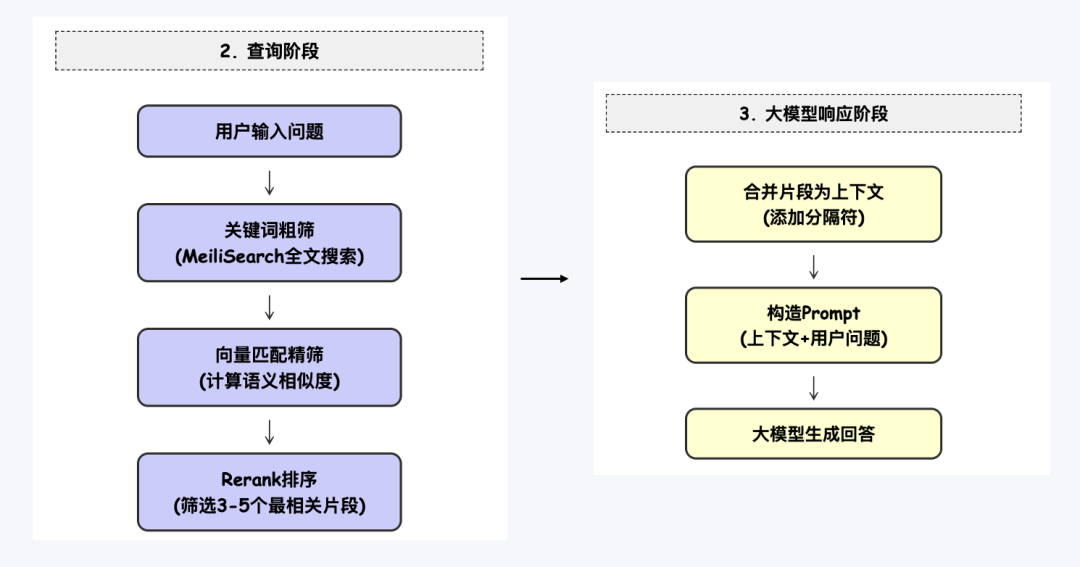
Stage 2 — Query Processing User queries undergo:
- Keyword-based coarse filtering
- Vector similarity matching
- Reranking for relevance scoring
Stage 3 — LLM Response Generation Prompt engineering drives this stage—including multiple optimized prompt templates:
Key technologies employed include:
- Meilisearch for fast keyword filtering + fine-grained vector search (using our fine-tuned embedding model)
- Reranking algorithms
- Advanced tokenization
- Long-document chunking & reassembly strategies
- Prompt engineering and template optimization
In the next release, we’ll fully implement all three stages as modular, production-ready components. Our top priority: achieving high RAG accuracy without sacrificing speed. We aim to deliver sub-second response times even on consumer-grade hardware.
Currently, most local knowledge-base systems take over 2 minutes per query. We’re determined to solve this bottleneck—making truly responsive, local RAG a reality.
Summary
This article introduces DeepSeekMine v0.5, covering: ✅ How to use it ✅ Where to get the one-click installer (Windows/macOS supported) ✅ Technical architecture and upcoming roadmap
The next version will prioritize RAG accuracy and latency reduction—leveraging robust engineering to deliver blazing-fast local knowledge retrieval. We’re confident these improvements will significantly elevate the user experience.
Apply This Lesson
Turn this article into AI software, model, API, and security decisions.
English Article FAQ
Use this article as evidence before choosing AI tools
How should I use this AI Tutorials article?
Use it as the implementation or learning layer, then connect the idea to AI software buyer guides, tool comparisons, benchmarks, API choices, and security checks before making a production decision.
Is this English article different from the Chinese original?
The English edition is localized for global AI readers while preserving the original diagrams, screenshots, prompts, code examples, and source context from the Chinese article.
What should I read after DeepSeek v0.5 Released: Local Knowledge Base Integration for Windows and macOS?
Continue with AI Software Buyer Guides, AI Tools Workbench, Best AI Coding Agents, AI Model Benchmarks, OpenAI vs Anthropic API, or LLM Security Tools depending on the decision you need to make.
Can this article alone choose an AI product or model?
No. Treat the article as evidence and context, then validate fit with pricing, privacy requirements, integration effort, benchmark results, workflow tests, and fallback planning.
Continue