English translation
Integrating DeepSeek with Coze: Rapid AI Agent Development That Lives Up to the Hype
AI Article Decision Snapshot
Turn the lesson into workflow, model, budget, and security checks before choosing tools.
Use this quick snapshot before leaving the article. It keeps the next search tied to practical AI software, model/API, cost, privacy, and implementation questions.
Workflow fit
Identify the real job behind the article: coding, research, document review, support, analytics, content, or internal automation.
Model or tool decision
Decide whether the next step is a software shortlist, an AI tool comparison, an API platform choice, or a model benchmark.
Budget and usage signal
Estimate seats, API calls, prompt volume, retries, review time, and fallback work before assuming the workflow is cheap.
Security and privacy review
Check whether source code, customer data, private documents, prompts, logs, or embeddings will enter the AI workflow.
The core value of an agent platform lies not in how beautiful its UI is, but in whether it can reliably execute end-to-end task workflows—for example: first identifying user intent, then querying a knowledge base, followed by invoking external tools, and finally returning the result. Merely enabling chat with a large language model falls far short of building a true AI agent.
When building your first agent, avoid overambition. Start with a narrowly scoped, well-defined task—such as document retrieval or form data consolidation—and fully implement its input handling, tool integration, output formatting, and failure messaging. Once this minimal version runs stably, gradually layer in more complex logic.
Recently, several readers reached out via private messages asking how to build a practical, production-ready AI agent leveraging DeepSeek’s powerful reasoning capabilities—combined with external plugins—to enable real-time web access, arbitrary webpage parsing, and content analysis.
Over the weekend, I evaluated various implementation approaches. Today, I’ll introduce a nearly code-free solution—ideal for non-developers. If you’re curious, read on.
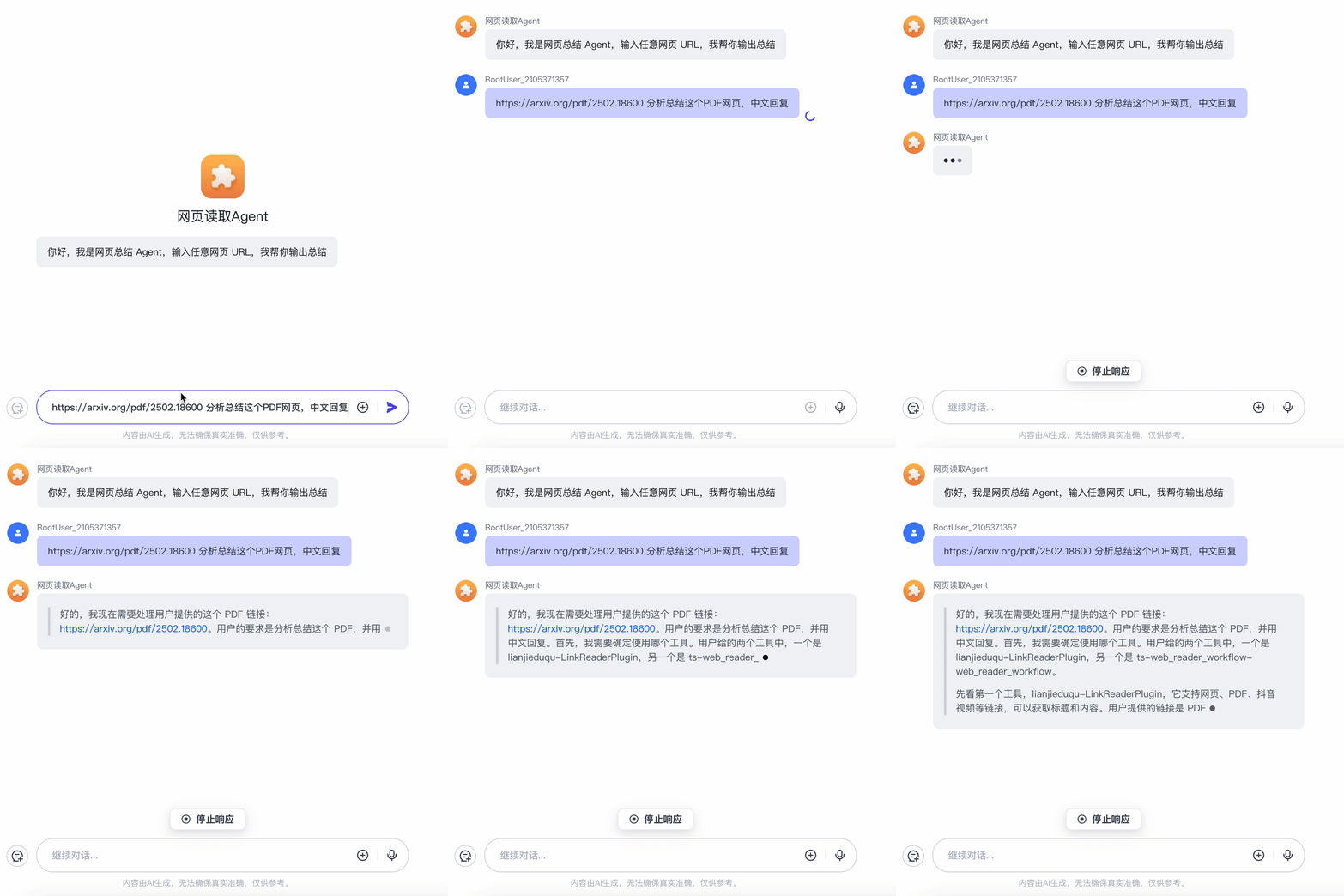
Following the steps outlined below, you’ll be able to build an agent capable of fetching and analyzing any webpage. As shown below, the agent automatically loads a PDF-hosting webpage and begins reasoning immediately. Due to WeChat Official Account GIF frame limitations, only the initial frames are shown:
1 What Is an AI Agent?
Before diving in, many readers may be unfamiliar with AI agents—so let’s start with fundamentals: what exactly is an AI agent, and what are its core components?
An AI agent is a computational system that perceives its environment and takes autonomous actions to achieve specific goals. Put simply, it’s a “robot” that dynamically responds to environmental changes.
For example, consider a human driver (a super-powered biological AI agent) operating a vehicle. When encountering a red traffic light—the environmental change—the brain processes the signal and decides to brake and stop—the agent’s decision-making step.
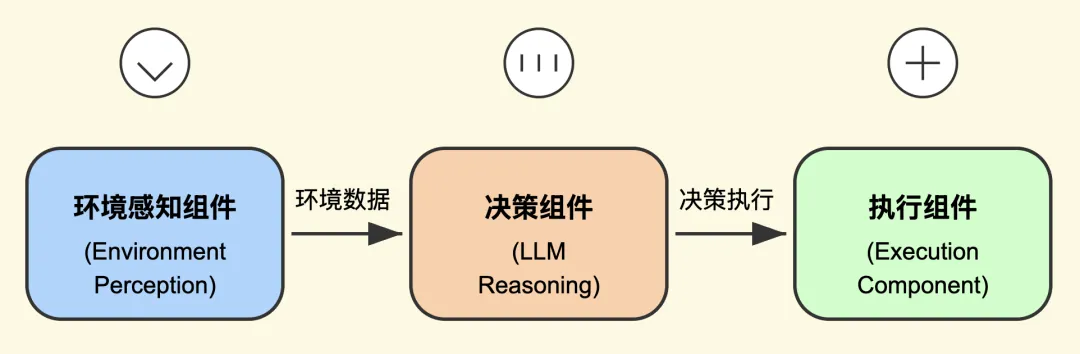
From this example, we can identify three essential components of any agent system:
- A perception module, detecting environmental changes (e.g., seeing the red light);
- A reasoning/decision module, determining appropriate action (e.g., deciding to brake);
- An execution module, carrying out the action (e.g., pressing the brake pedal).
As illustrated below, these constitute three foundational elements of an agent architecture:
Having grasped these basic principles, let’s now explore how to build an agent that fetches and analyzes arbitrary webpages.
2 The Implementation Strategy
Let’s test directly on the DeepSeek official website: ask DeepSeek to summarize a webpage—and it replies that it cannot access external links directly, as shown below:
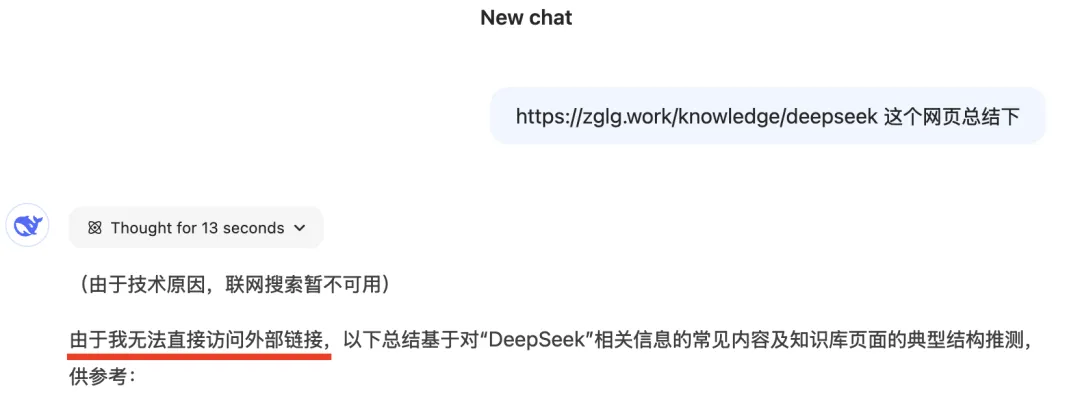
DeepSeek-R1 itself recognizes this limitation during reasoning: it cannot natively fetch or render web content—it can only infer based on prior training data. Even the most advanced reasoning models cannot directly access live web pages:

The solution? Enable the LLM to autonomously invoke external tools when it detects tasks beyond its native capabilities. With assistance from those tools, DeepSeek receives structured responses and continues downstream reasoning.
This capability—calling external functions or plugins—is formally known as Function Calling. When DeepSeek-R1 (full-capability version) is augmented with robust Function Calling support, it can fulfill precisely the use case described at the outset: fetching and analyzing any webpage.
We’ve found that Coze’s platform already offers DeepSeek-R1 (full version) plus seamless plugin invocation. Next, let’s walk through the detailed setup process.
3 Building a Webpage-Reading Agent
Below, I’ll guide you step-by-step through the construction process—and explain the underlying technical concepts. Just follow along, and you’ll have a working agent in minutes.
Step 1: Go to coze.cn. On the homepage’s left sidebar, click the + button near the top (see screenshot):

A dialog appears—click “Create Agent”:

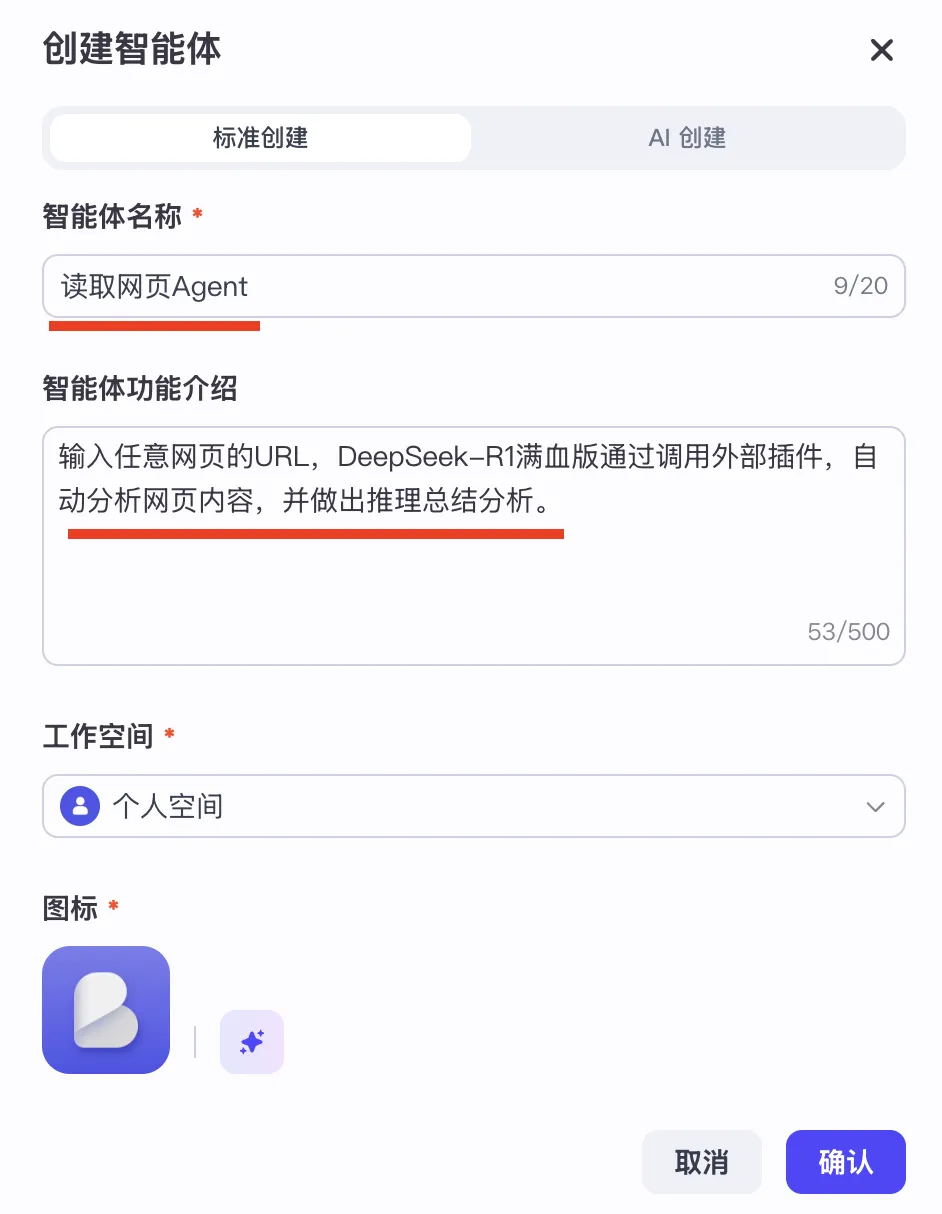
Step 2: In the next dialog, enter your agent’s name and description. You may copy the values shown below—or customize them freely—then click “Confirm”:
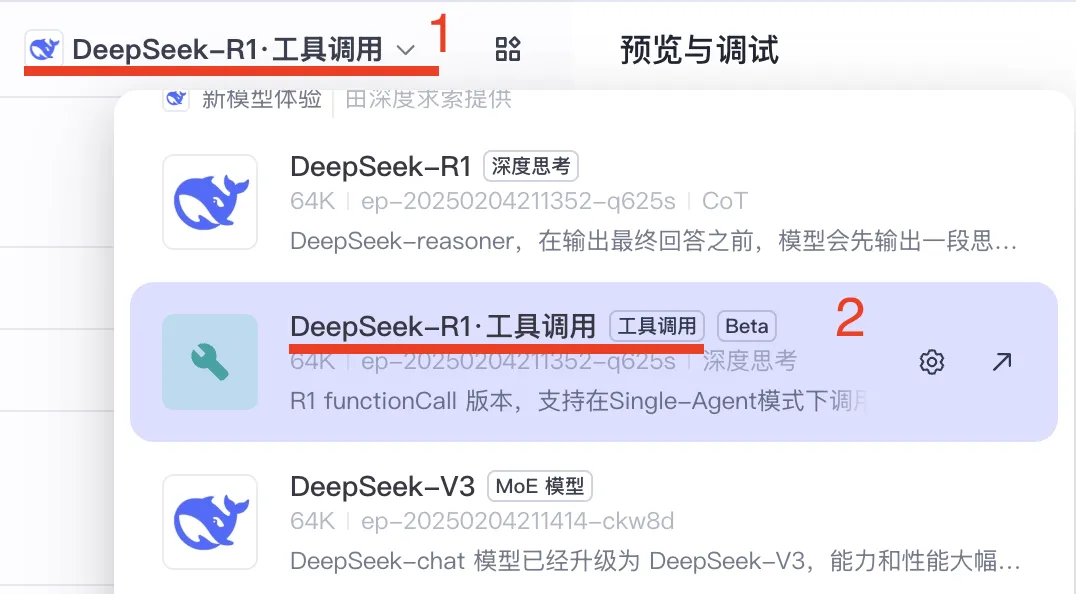
Step 3: You’ll land on the agent configuration page. Click ① to select the Large Language Model, then choose “DeepSeek-R1 Tool Calling Model”—explicitly labeled as supporting R1’s Function Calling capability:
Step 4: Next, equip your agent with the ability to fetch webpages—this is the most critical step. Use Coze’s Plugin feature: click “Plugins”:

You’ll see the plugin management interface. Click + to add a new plugin:

Search for and select the “Link Reader” plugin, then click “Add”:

After adding, the plugin appears in your agent’s plugin list, as shown:

That’s it—just four simple steps! Your DeepSeek-R1 agent now has full webpage-fetching capability. The preview panel on the right displays your newly built “Webpage Reader Agent”, where you can test and debug interactively:

Now paste the same problematic webpage URL that DeepSeek couldn’t analyze earlier—and test the agent:
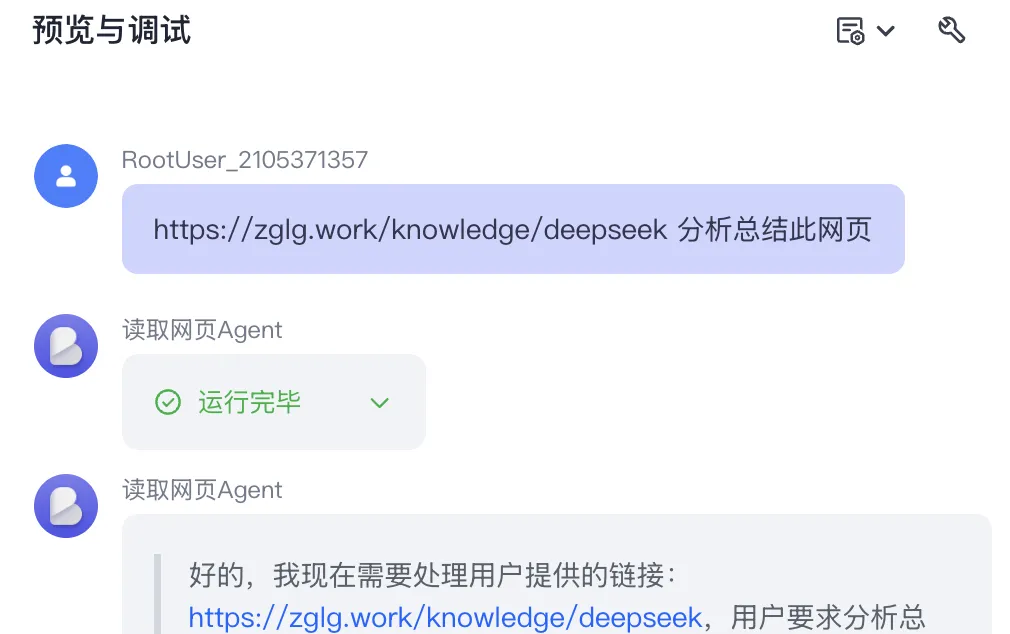
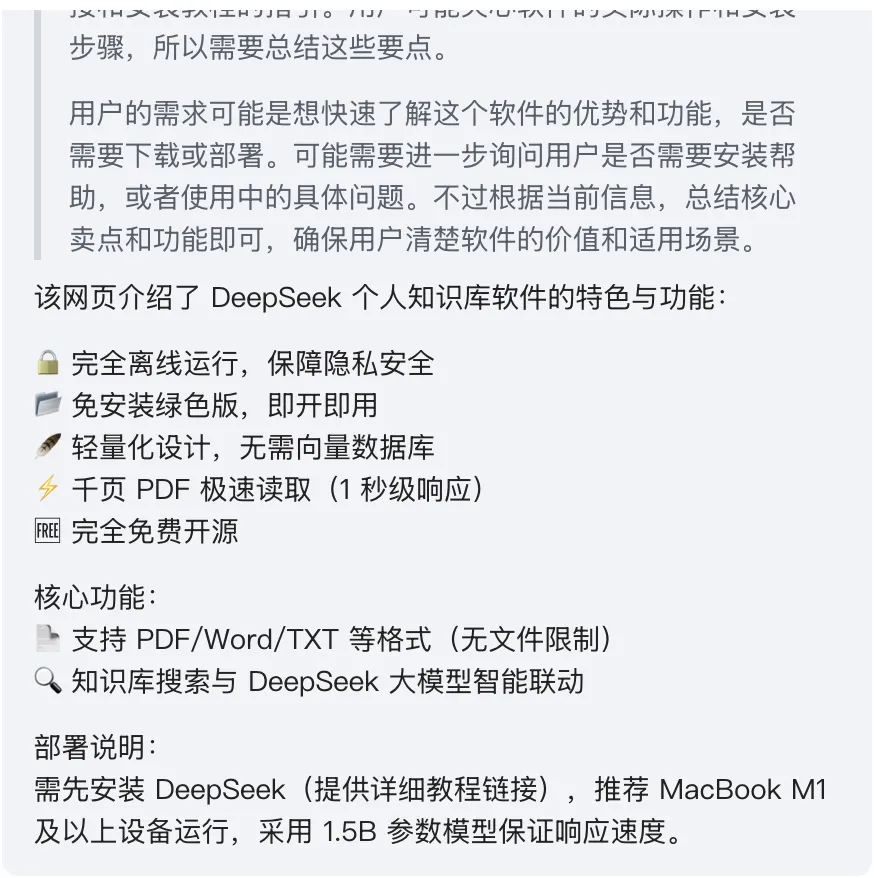
The response includes both the full reasoning trace and a concise, insightful summary of the webpage content:
Click “Publish”, and your agent goes live instantly. Let’s further test its ability to fetch and analyze PDFs.
Here’s a recent paper on reasoning—its arXiv PDF link is:
https://arxiv.org/pdf/2502.18600
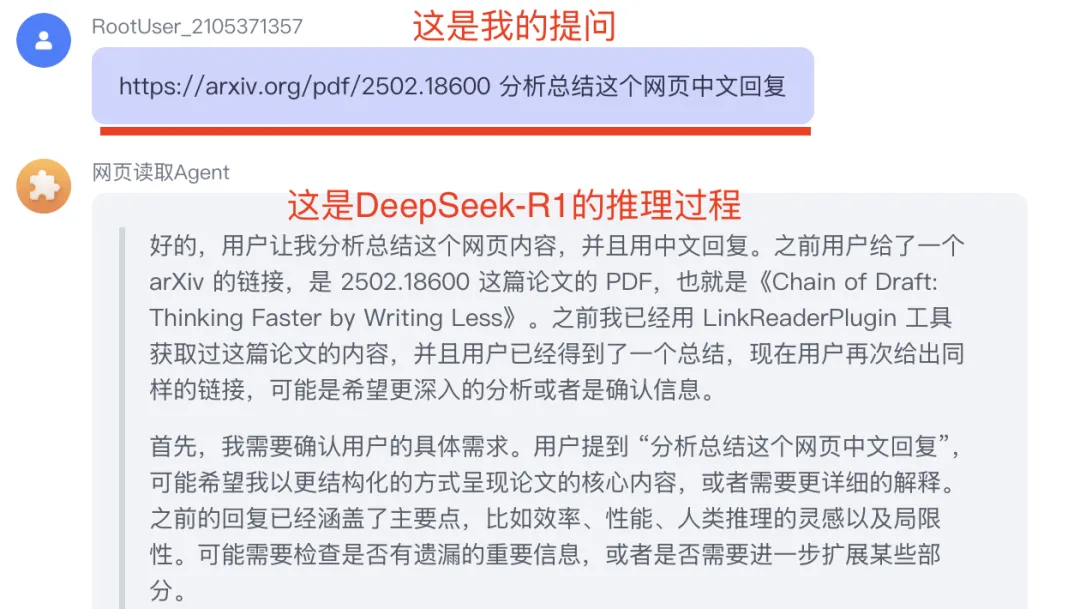
Copy this URL and feed it directly to your “Webpage Reader Agent”:
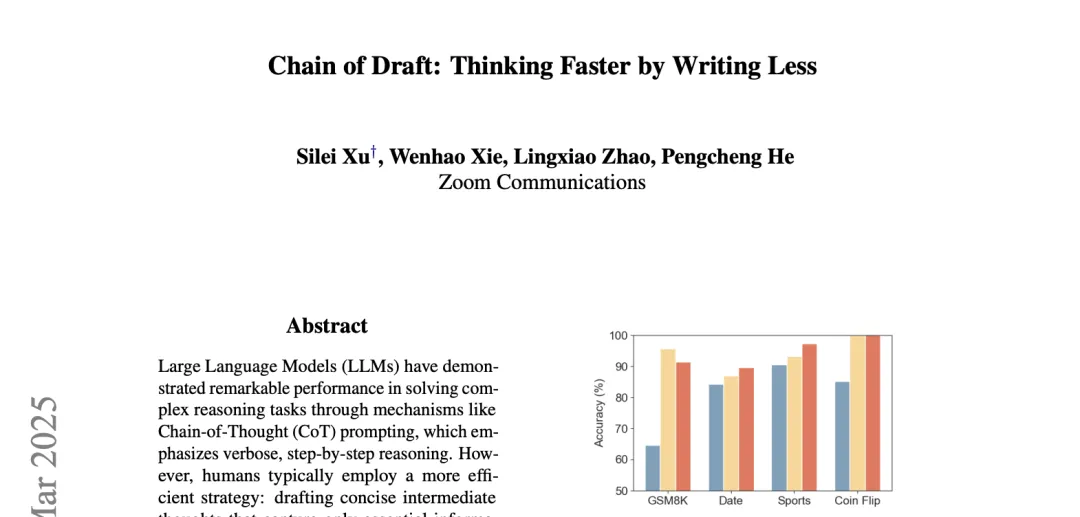
Below is a partial screenshot showing my query and the agent’s internal reasoning steps:
And here’s part of the final analytical output:
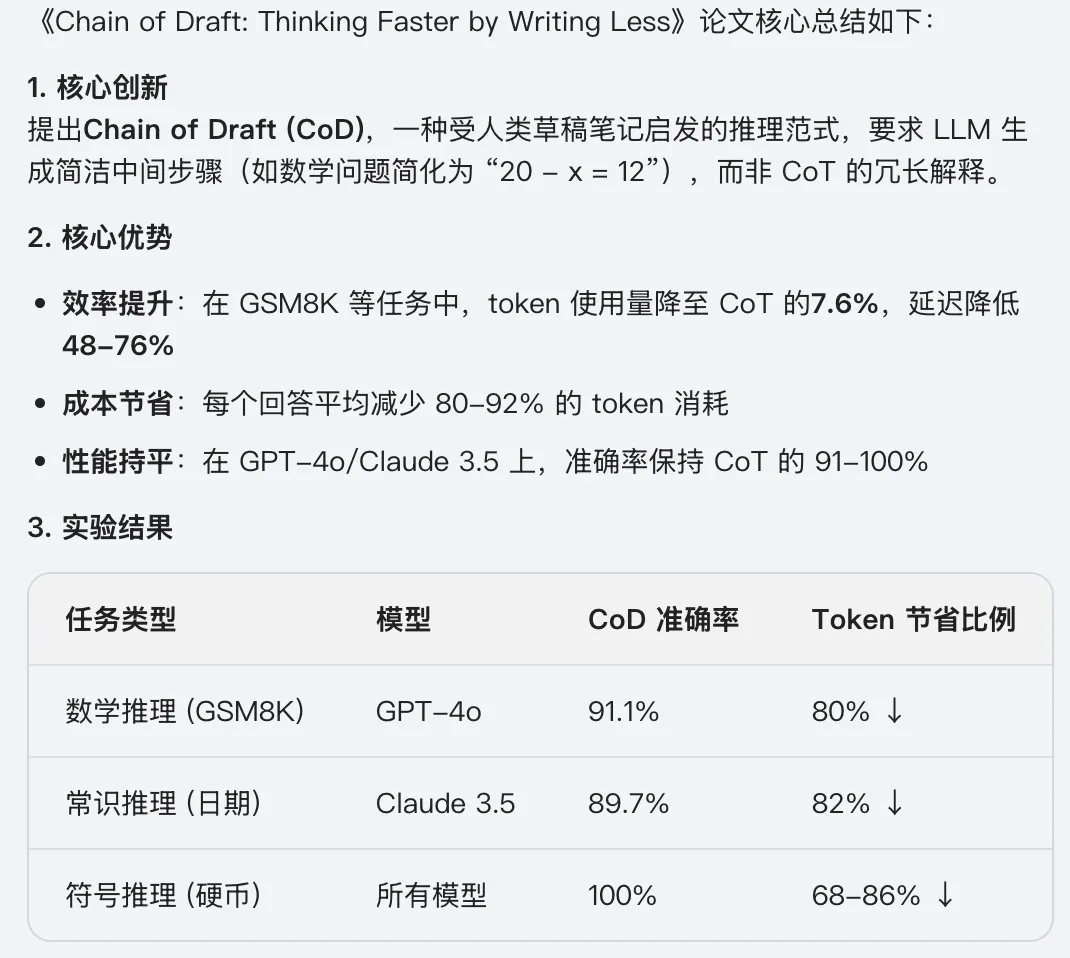
The entire 20+ page paper was parsed, understood, and summarized in under one minute.
This “Webpage Reader Agent” doesn’t just handle plain text or PDFs—it also extracts and interprets tables and even analyzes embedded images. It’s genuinely versatile and production-ready.
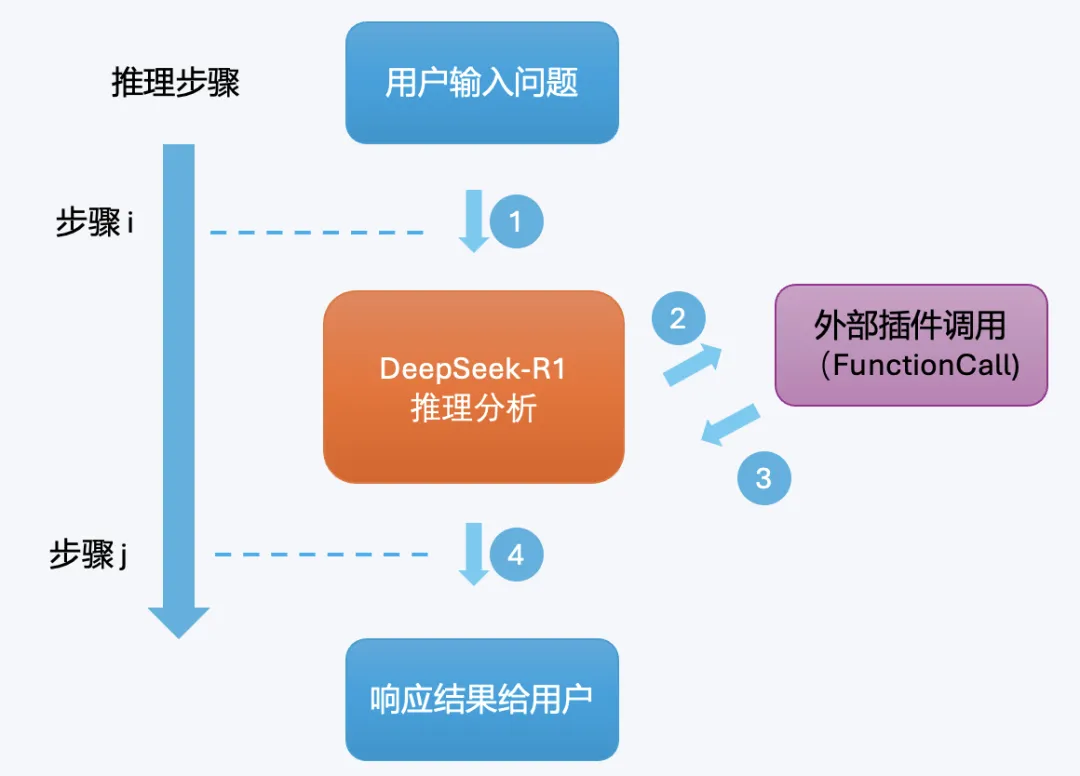
Let’s briefly unpack the underlying mechanism. As visualized in the flowchart below:
- ①: User submits a query to DeepSeek-R1;
- ②: During reasoning (at step i), DeepSeek-R1 determines it needs external help—and triggers a plugin call;
- ③: The plugin executes, fetches the webpage/PDF, and returns structured content back to DeepSeek-R1;
- ④: DeepSeek-R1 resumes reasoning (at step j) and delivers the final answer to the user.
Beyond web reading, you can install additional plugins to extend functionality—e.g., a text-to-image generator. Once added, your agent gains DeepSeek-R1’s reasoning power plus multimodal generation—enabling it to produce images from textual prompts. Explore Coze’s plugin library to unlock even more capabilities.
Summary
This article demonstrated how to integrate DeepSeek into an AI agent framework—specifically solving DeepSeek’s native inability to fetch and analyze live web content.
The solution leverages Coze’s built-in Function Calling infrastructure to seamlessly bridge DeepSeek-R1 with external tools. Using the “Webpage Reader Agent” as a concrete example, we walked through the complete workflow—from plugin selection to deployment.
In summary, this approach is:
- ✅ Extremely low-code (nearly zero-code);
- ✅ Rapid to set up and iterate;
- ✅ Highly practical and production-ready.
If you’d like to harness DeepSeek’s reasoning power more effectively, click “Read Original Article” below to start building your own custom agent on Coze—using this guide as your reference.
Total word count: 2,682 | Total figures: 19 If you found this article helpful, please consider: 🔹 Following this account 🔹 Liking, sharing, and bookmarking this post 🔹 Adding a ⭐️ star to show appreciation
Thanks for reading—and see you in the next article!
Apply This Lesson
Turn this article into AI software, model, API, and security decisions.
English Article FAQ
Use this article as evidence before choosing AI tools
How should I use this AI Tutorials article?
Use it as the implementation or learning layer, then connect the idea to AI software buyer guides, tool comparisons, benchmarks, API choices, and security checks before making a production decision.
Is this English article different from the Chinese original?
The English edition is localized for global AI readers while preserving the original diagrams, screenshots, prompts, code examples, and source context from the Chinese article.
What should I read after Integrating DeepSeek with Coze: Rapid AI Agent Development That Lives Up to the Hype?
Continue with AI Software Buyer Guides, AI Tools Workbench, Best AI Coding Agents, AI Model Benchmarks, OpenAI vs Anthropic API, or LLM Security Tools depending on the decision you need to make.
Can this article alone choose an AI product or model?
No. Treat the article as evidence and context, then validate fit with pricing, privacy requirements, integration effort, benchmark results, workflow tests, and fallback planning.
Continue