English translation
3 Practical Tips for Using DeepSeekMine Personal Knowledge Base Software
AI Article Decision Snapshot
Turn the lesson into workflow, model, budget, and security checks before choosing tools.
Use this quick snapshot before leaving the article. It keeps the next search tied to practical AI software, model/API, cost, privacy, and implementation questions.
Workflow fit
Identify the real job behind the article: coding, research, document review, support, analytics, content, or internal automation.
Model or tool decision
Decide whether the next step is a software shortlist, an AI tool comparison, an API platform choice, or a model benchmark.
Budget and usage signal
Estimate seats, API calls, prompt volume, retries, review time, and fallback work before assuming the workflow is cheap.
Security and privacy review
Check whether source code, customer data, private documents, prompts, logs, or embeddings will enter the AI workflow.
The most effective usage tips emerge from real, repeated scenarios. For example: clear file naming, grouping similar documents, and including timeframes or scopes in your questions—these seemingly minor habits significantly impact retrieval quality and answer accuracy. The smarter the tool, the more disciplined your knowledge management must be.
We recommend organizing your personal knowledge base into three layers:
- Source origin (e.g., email, notes, reports),
- Thematic categories (e.g., finance, health, work),
- Frequently asked questions (FAQs).
Each time you add a batch of files, take a moment to draft several test questions. This ensures your knowledge base grows more usable over time—not more chaotic.
Most of us store vast numbers of files on our computers. With the rapid advancement of large language models (LLMs), efficiently retrieving from our personal knowledge bases—and then leveraging LLMs to analyze those results—is now a highly effective way to boost productivity.
Over the past two months, a teammate and I collaborated intensively to implement LLM integration with personal knowledge bases—commonly known as RAG (Retrieval-Augmented Generation).
To make it memorable, we named the software: DeepSeekMine.
In this article, I’ll address common questions users have about DeepSeekMine-V6, and dive deep into the underlying algorithms and technical principles—ideal for those curious about how it works.
1. Tip #1: Categorize Your Documents Strategically
Personal documents naturally fall into categories—such as lifestyle, work, finance, sports, news, and entertainment. Recognizing this, our DeepSeekMine algorithm explicitly incorporates category-aware processing. This not only accelerates LLM response speed but also improves RAG precision.
In the UI, this manifests as customizable category cards. As shown below, four categories have been created:
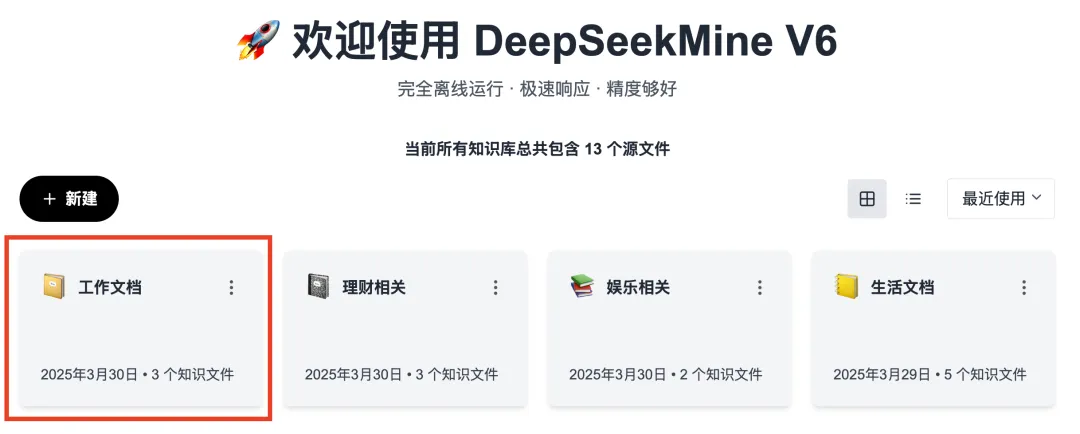
We strongly recommend creating multiple such category cards and uploading your documents accordingly. ✅ This is Tip #1.
2. Tip #2: Optimize Queries with Precise Keywords
Running LLMs locally consumes significant system resources—and adding RAG further increases demand. Other local knowledge-base tools (e.g., Cherry, AnythingLLM) often suffer from long latency; in my tests, some responses took up to two minutes. To solve this, DeepSeekMine-V6 achieves sub-second replies, even when using the lightweight DeepSeek-R1:1.5b model.
Below is a real-time GIF demonstrating response speed—no frame acceleration applied; all frames preserved at native speed. My test machine: Apple M1 Pro, 16 GB RAM, no discrete GPU:
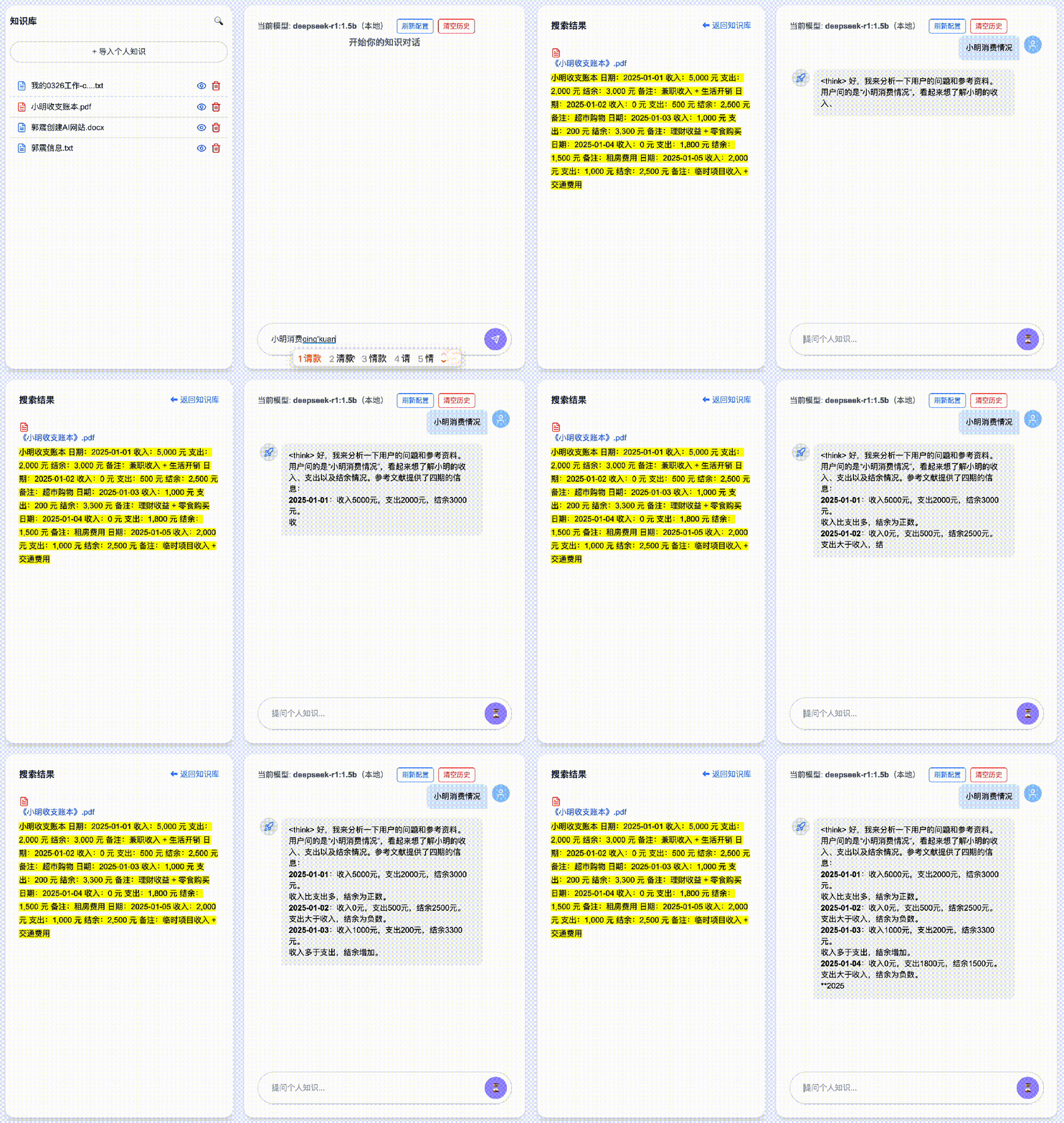
How do we achieve sub-second RAG on modest hardware? DeepSeekMine employs a hybrid RAG algorithm, combining keyword-based search with semantic vector retrieval for high-efficiency augmentation.
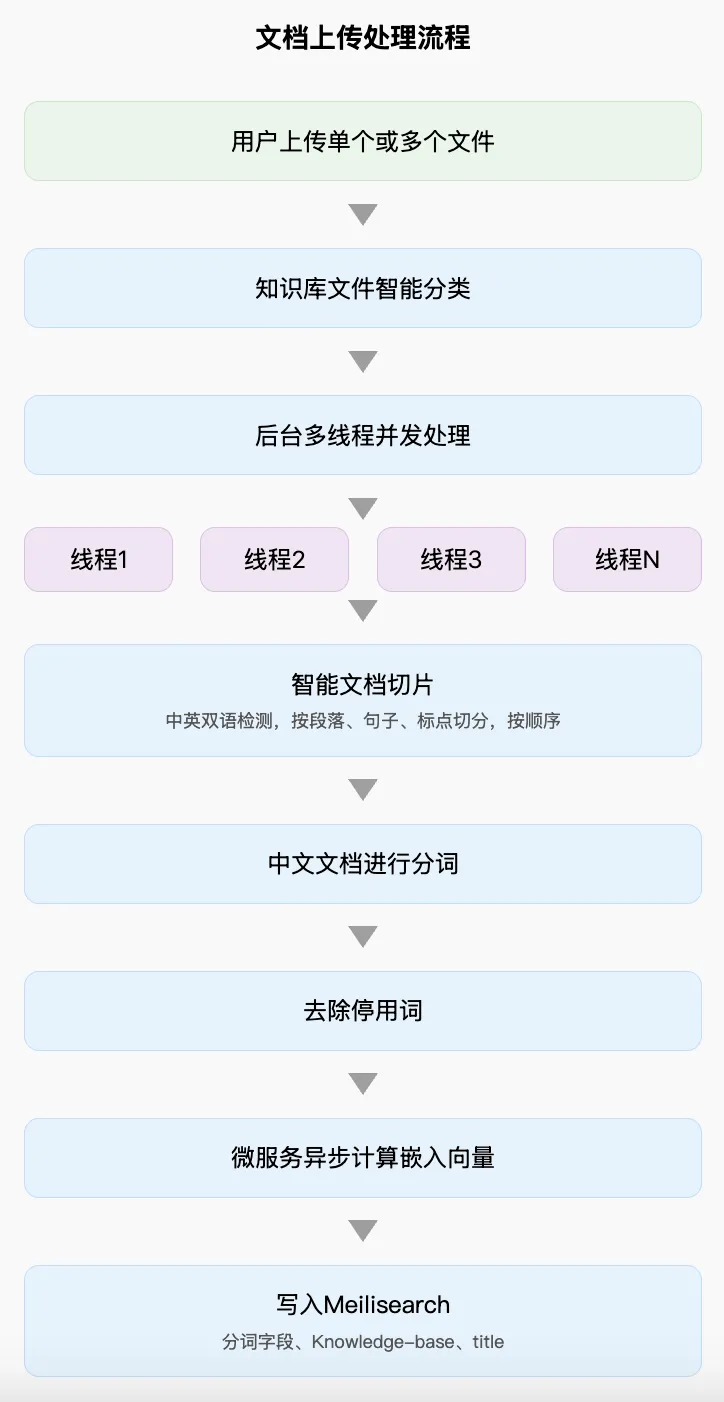
From an architectural perspective, the hybrid RAG pipeline consists of two parallel workflows:
- Document ingestion, and
- Query processing.
Document Ingestion Pipeline
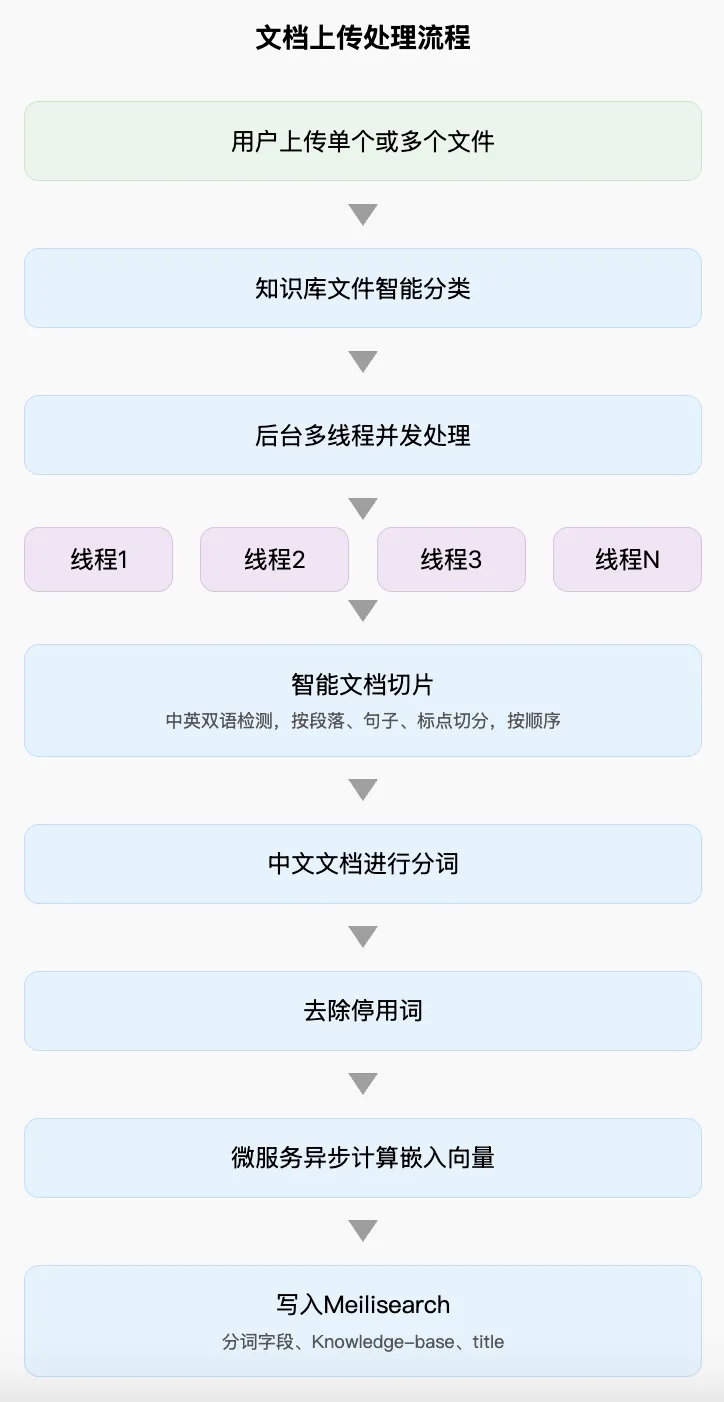
The flow includes: → User uploads one or multiple files → Intelligent classification into predefined categories → Concurrent multi-threaded backend processing → Thread 1 / Thread 2 / Thread 3 / … → Smart document chunking → Chinese text tokenization → Stop-word removal → Microservice-based asynchronous embedding computation → Embeddings written to Meilisearch:
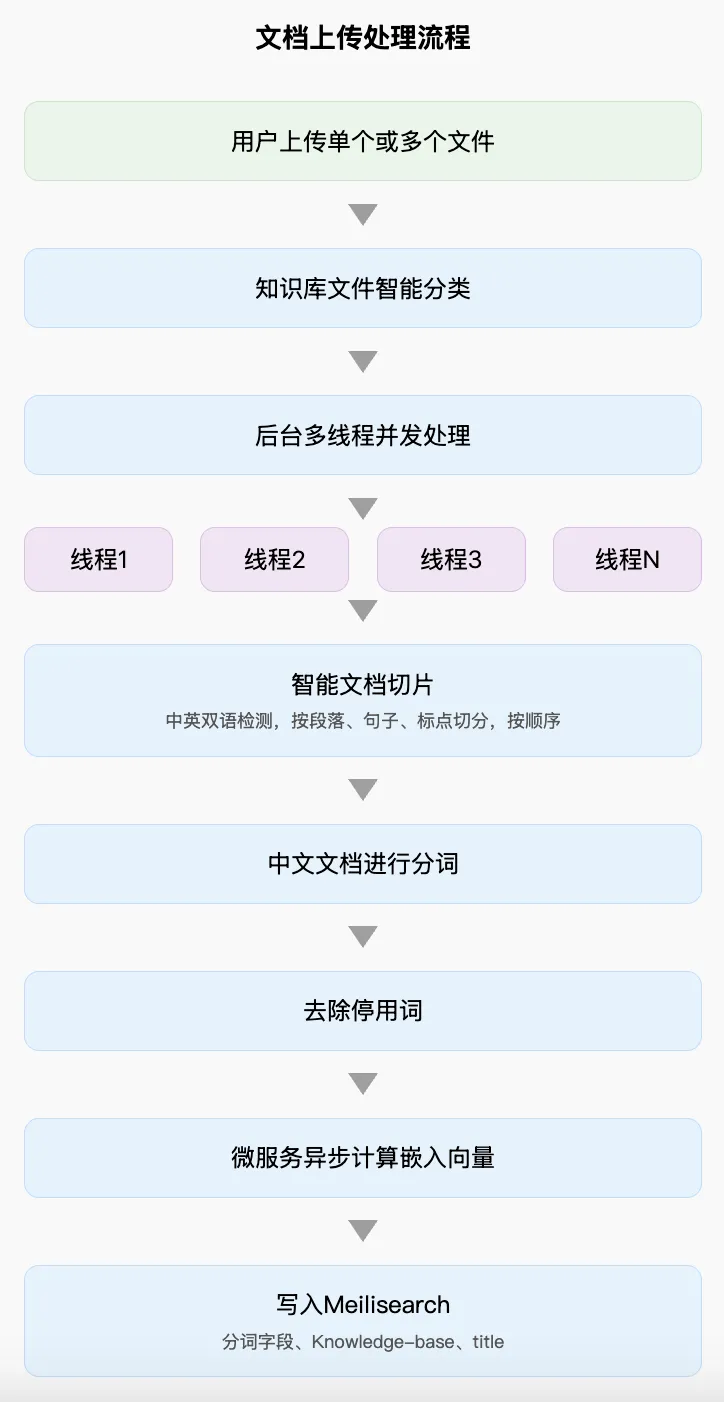
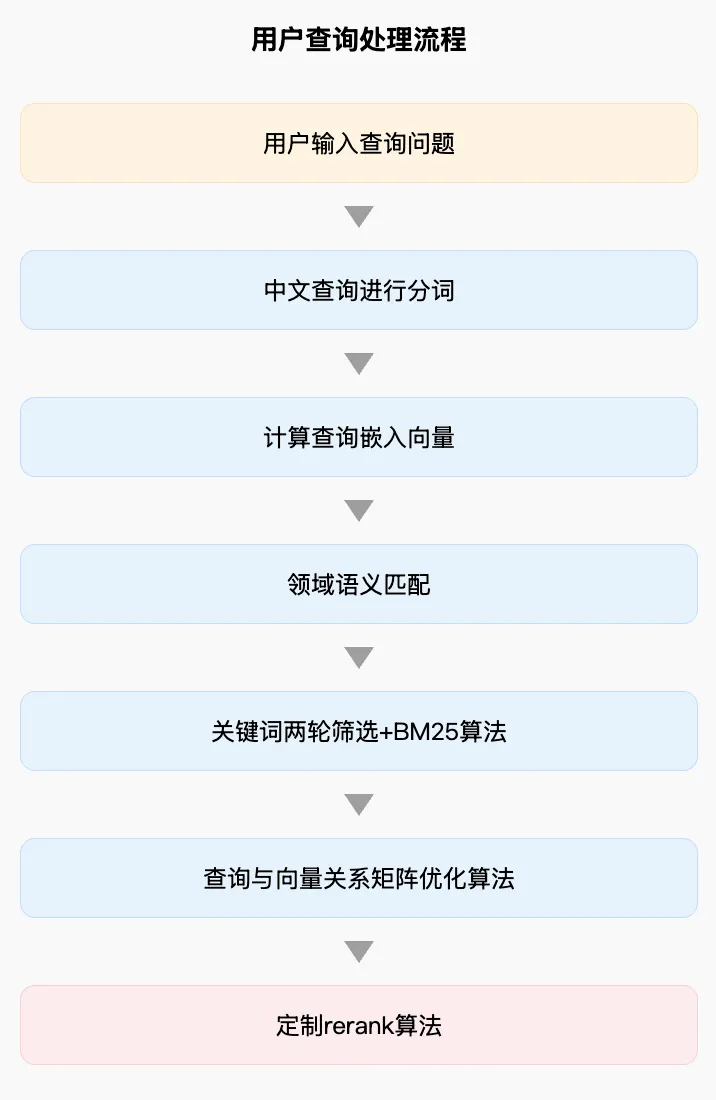
Query Processing Pipeline
The flow includes: → User submits a query → Chinese query tokenization → Query embedding generation → Domain-aware semantic matching → Two-stage keyword filtering + BM25 ranking → Query–vector relationship matrix optimization → Custom re-ranking algorithm:
Given this design, always include precise, context-rich keywords in your questions—and combine them thoughtfully. ✅ This is Tip #2.
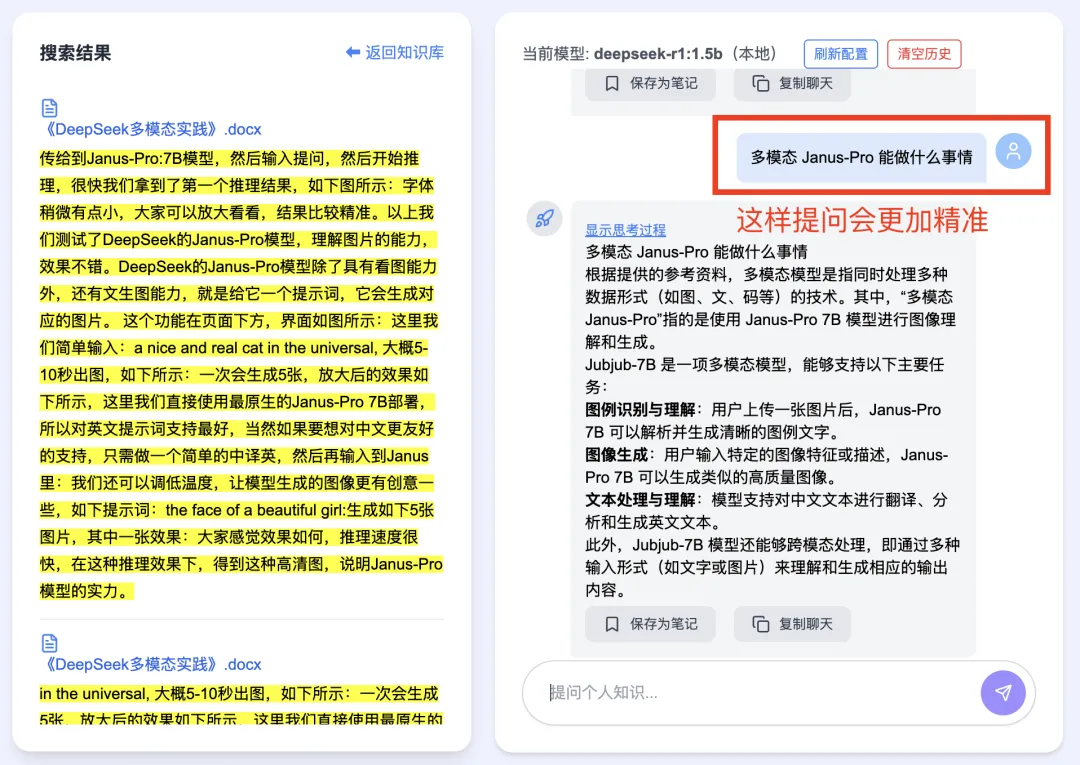
For example, asking:
“What can Janus-Pro do?” …where “Janus-Pro” is the critical keyword—yields remarkably accurate summaries, even with the compact 1.5B model. With larger models, performance soars:
3. Tip #3: Manage Conversation History Intelligently
A single session may involve multiple back-and-forth exchanges between user and assistant. DeepSeekMine injects both the conversation history and retrieved knowledge-base documents into the LLM—leveraging its few-shot learning capability to synthesize insights.
However, many RAG applications face a common pitfall: if any prior response drifts off-topic or misinterprets context, it degrades subsequent answers.
To prevent this, DeepSeekMine provides a “Clear History” button. Click it anytime responses begin drifting—and start fresh. ✅ This is Tip #3:
To further minimize drift, DeepSeekMine supports flexible LLM configuration—a feature many users ask about. Here’s how it works:
- With Ollama-installed local models: simply change
1.5b→8b, and DeepSeekMine automatically switches to the 8B model:
- Cloud API models are also supported—configuration is straightforward:
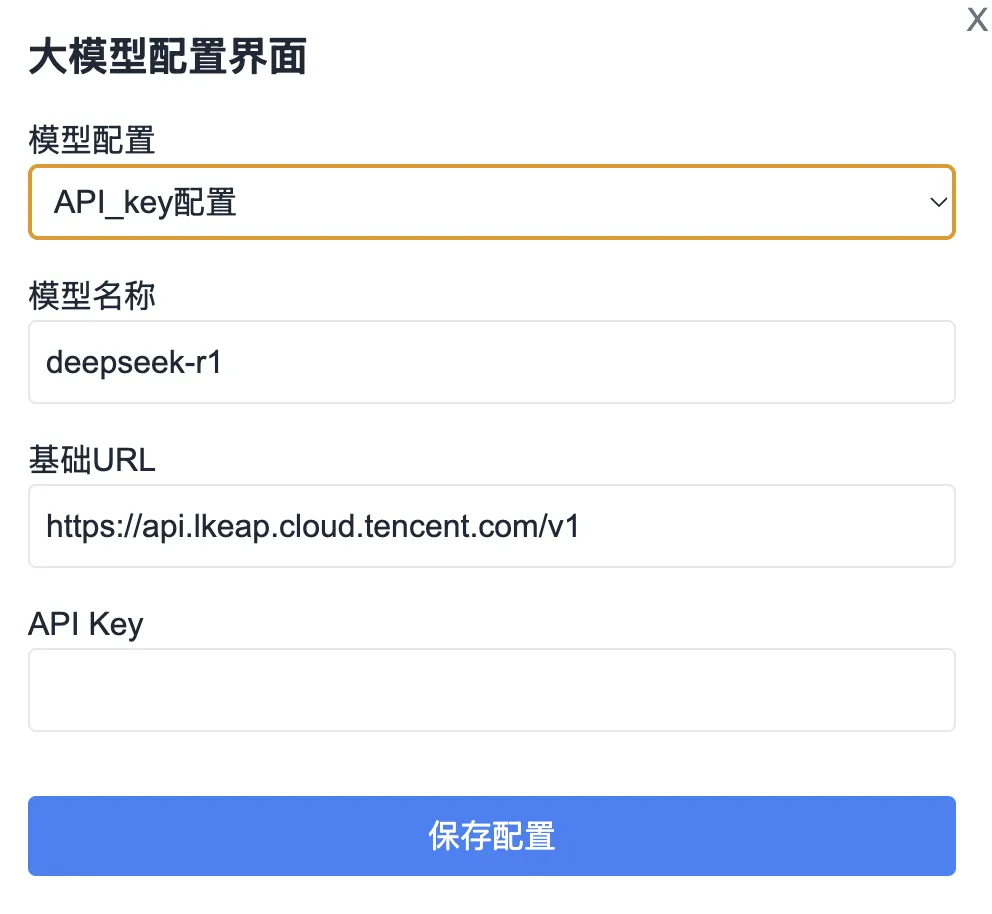
If you haven’t yet obtained the latest DeepSeekMine-V6, reply “knowledge base” in the WeChat official account below:

4. Upcoming V7 Release Plan
Here’s what’s planned for the next major version:
-
RAG Core Optimization Continuous refinement of the RAG algorithm to improve both Precision and Recall—the two fundamental metrics governing retrieval and generation quality.
-
Expanded Model Support Integration of more powerful LLMs—including those impractical for local deployment due to hardware constraints.
- Example: Full-parameter
DeepSeek-R1(671B, FP16) requires hundreds of high-end GPUs, costing millions to deploy. Even quantized versions remain prohibitively expensive for individuals. - Closed-source models will be accessible via secure, low-latency API integrations—enhancing RAG accuracy without local overhead.
- Example: Full-parameter
-
UI/UX Enhancements Ongoing interface improvements remain a top priority—to deliver smoother, more intuitive interactions. For instance, the main interface will soon support a collapsible three-column layout, enabling responsive, customizable views:
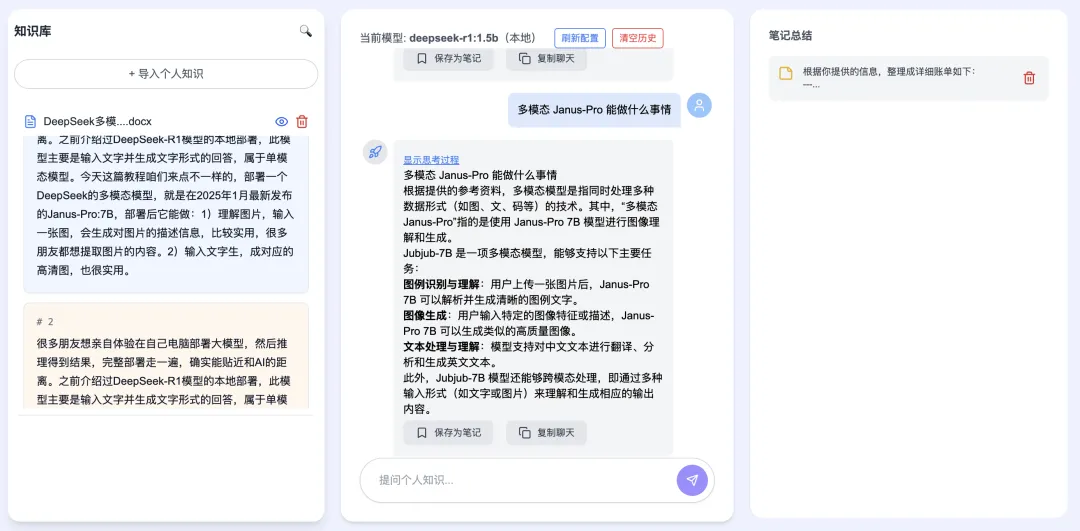
- Feature Roadmap We’re actively evaluating community-suggested features—and prioritizing development based on user feedback.
5. Summary
This article covered:
- Three practical DeepSeekMine usage tips,
- LLM configuration options, and
- The V7 development roadmap.
The Three Key Tips Recap:
- Categorize uploads → boosts retrieval efficiency and answer accuracy.
- Use hybrid RAG + keyword-rich queries → enables sub-second responses under resource constraints.
- Leverage history management + model switching → maintains answer fidelity across multi-turn conversations.
Finally, V7 will push further: refining RAG precision, integrating stronger models (local and cloud), and polishing UI/UX—continuously raising the bar for personal knowledge management.
Apply This Lesson
Turn this article into AI software, model, API, and security decisions.
English Article FAQ
Use this article as evidence before choosing AI tools
How should I use this AI Tutorials article?
Use it as the implementation or learning layer, then connect the idea to AI software buyer guides, tool comparisons, benchmarks, API choices, and security checks before making a production decision.
Is this English article different from the Chinese original?
The English edition is localized for global AI readers while preserving the original diagrams, screenshots, prompts, code examples, and source context from the Chinese article.
What should I read after 3 Practical Tips for Using DeepSeekMine Personal Knowledge Base Software?
Continue with AI Software Buyer Guides, AI Tools Workbench, Best AI Coding Agents, AI Model Benchmarks, OpenAI vs Anthropic API, or LLM Security Tools depending on the decision you need to make.
Can this article alone choose an AI product or model?
No. Treat the article as evidence and context, then validate fit with pricing, privacy requirements, integration effort, benchmark results, workflow tests, and fallback planning.
Continue